京东云OCR识别PDF图片并批量改名解决方案
一、应用场景
在日常办公和文档管理中,经常会遇到大量 PDF 文件需要根据内容进行分类和命名的情况。例如:
- 企业合同管理系统需要根据合同编号、日期等内容自动命名 PDF 文件
- 图书馆数字化项目需要将扫描的图书章节按照标题命名
- 财务部门需要将发票 PDF 按照发票号码、金额等信息自动归类
京东云 OCR 提供了强大的文字识别能力,可以准确识别 PDF 中的文字信息,结合 C# 开发的桌面应用程序,可以实现高效的 PDF 批量改名工作流。
二、界面设计
一个直观易用的界面设计可以提高工作效率,建议包含以下元素:
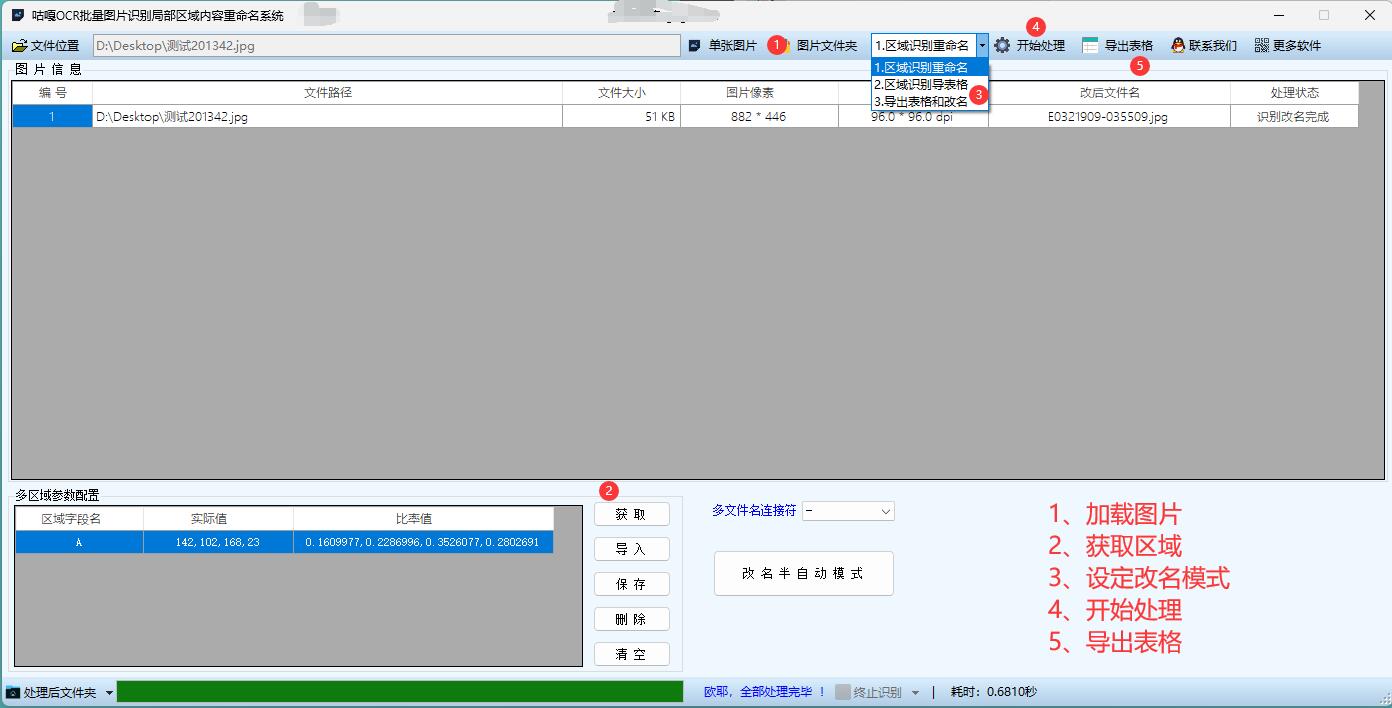
- 文件选择区域:支持拖拽和文件选择对话框选择多个 PDF 文件
- OCR 配置区域:选择 OCR 模板、设置识别语言等
- 预览区域:显示原始文件名、识别内容和建议的新文件名
- 处理进度条:显示当前处理进度和状态
- 操作按钮:开始处理、取消、保存设置等
三、详细代码步骤解析
using System;
using System.Collections.Generic;
using System.ComponentModel;
using System.Data;
using System.Drawing;
using System.IO;
using System.Linq;
using System.Text;
using System.Text.RegularExpressions;
using System.Threading.Tasks;
using System.Windows.Forms;
using Newtonsoft.Json;
using RestSharp;namespace JdCloudOcrPdfRenameTool
{public partial class MainForm : Form{// 京东云OCR配置信息private string accessKeyId = "";private string secretAccessKey = "";private string serviceEndpoint = "https://ocr.jdcloud-api.com/v1/regions/cn-north-1";// 存储待处理的PDF文件列表private List<string> pdfFiles = new List<string>();// 存储处理结果private List<RenameItem> renameItems = new List<RenameItem>();public MainForm(){InitializeComponent();InitializeUI();}private void InitializeUI(){// 设置窗体基本属性this.Text = "JDOCR_PDF图片识别改名工具";this.Size = new Size(900, 600);this.StartPosition = FormStartPosition.CenterScreen;// 创建控件CreateFileSelectionPanel();CreateOcrConfigPanel();CreatePreviewPanel();CreateActionButtons();// 加载配置LoadSettings();}private Panel fileSelectionPanel;private TextBox txtSelectedFiles;private Button btnSelectFiles;private Button btnClearFiles;private void CreateFileSelectionPanel(){fileSelectionPanel = new Panel{Dock = DockStyle.Top,Height = 100,BorderStyle = BorderStyle.FixedSingle};Label lblFileSelection = new Label{Text = "选择PDF文件:",Location = new Point(10, 10),AutoSize = true};txtSelectedFiles = new TextBox{Location = new Point(10, 30),Size = new Size(650, 23),ReadOnly = true};btnSelectFiles = new Button{Text = "选择文件",Location = new Point(670, 30),Size = new Size(100, 23)};btnSelectFiles.Click += BtnSelectFiles_Click;btnClearFiles = new Button{Text = "清除",Location = new Point(780, 30),Size = new Size(100, 23)};btnClearFiles.Click += BtnClearFiles_Click;Label lblDragDrop = new Label{Text = "或者直接将PDF图片识别文件拖放到此处...",Location = new Point(10, 60),ForeColor = Color.Gray};fileSelectionPanel.Controls.Add(lblFileSelection);fileSelectionPanel.Controls.Add(txtSelectedFiles);fileSelectionPanel.Controls.Add(btnSelectFiles);fileSelectionPanel.Controls.Add(btnClearFiles);fileSelectionPanel.Controls.Add(lblDragDrop);// 设置拖放功能fileSelectionPanel.AllowDrop = true;fileSelectionPanel.DragEnter += FileSelectionPanel_DragEnter;fileSelectionPanel.DragDrop += FileSelectionPanel_DragDrop;this.Controls.Add(fileSelectionPanel);}private Panel ocrConfigPanel;private TextBox txtAccessKey;private TextBox txtSecretKey;private ComboBox cboOcrTemplate;private CheckBox chkOverwrite;private TextBox txtNameFormat;private Button btnSaveSettings;private void CreateOcrConfigPanel(){ocrConfigPanel = new Panel{Dock = DockStyle.Top,Height = 150,BorderStyle = BorderStyle.FixedSingle};Label lblAccessKey = new Label{Text = "Access Key:",Location = new Point(10, 10),Size = new Size(80, 20)};txtAccessKey = new TextBox{Location = new Point(100, 10),Size = new Size(250, 23),Text = accessKeyId};Label lblSecretKey = new Label{Text = "Secret Key:",Location = new Point(10, 40),Size = new Size(80, 20)};txtSecretKey = new TextBox{Location = new Point(100, 40),Size = new Size(250, 23),Text = secretAccessKey,PasswordChar = '*'};Label lblOcrTemplate = new Label{Text = "OCR模板:",Location = new Point(10, 70),Size = new Size(80, 20)};cboOcrTemplate = new ComboBox{Location = new Point(100, 70),Size = new Size(250, 23),DropDownStyle = ComboBoxStyle.DropDownList};cboOcrTemplate.Items.AddRange(new string[] { "通用文字识别", "身份证识别", "营业执照识别", "增值税发票识别" });cboOcrTemplate.SelectedIndex = 0;Label lblNameFormat = new Label{Text = "命名格式:",Location = new Point(380, 10),Size = new Size(80, 20)};txtNameFormat = new TextBox{Location = new Point(460, 10),Size = new Size(380, 23),Text = "{日期}_{关键词}_{序号}"};Label lblFormatHelp = new Label{Text = "支持变量: {日期}, {时间}, {关键词}, {页码}, {序号}, {原文件名}",Location = new Point(380, 40),Size = new Size(500, 20),ForeColor = Color.Gray,Font = new Font(Font, FontStyle.Italic)};chkOverwrite = new CheckBox{Text = "覆盖已存在文件",Location = new Point(380, 70),Size = new Size(120, 20)};btnSaveSettings = new Button{Text = "保存设置",Location = new Point(740, 100),Size = new Size(100, 23)};btnSaveSettings.Click += BtnSaveSettings_Click;ocrConfigPanel.Controls.Add(lblAccessKey);ocrConfigPanel.Controls.Add(txtAccessKey);ocrConfigPanel.Controls.Add(lblSecretKey);ocrConfigPanel.Controls.Add(txtSecretKey);ocrConfigPanel.Controls.Add(lblOcrTemplate);ocrConfigPanel.Controls.Add(cboOcrTemplate);ocrConfigPanel.Controls.Add(lblNameFormat);ocrConfigPanel.Controls.Add(txtNameFormat);ocrConfigPanel.Controls.Add(lblFormatHelp);ocrConfigPanel.Controls.Add(chkOverwrite);ocrConfigPanel.Controls.Add(btnSaveSettings);this.Controls.Add(ocrConfigPanel);}private Panel previewPanel;private DataGridView dgvPreview;private ProgressBar progressBar;private Label lblProgress;private void CreatePreviewPanel(){previewPanel = new Panel{Dock = DockStyle.Fill,BorderStyle = BorderStyle.FixedSingle};dgvPreview = new DataGridView{Dock = DockStyle.Fill,AutoGenerateColumns = false,SelectionMode = DataGridViewSelectionMode.FullRowSelect,MultiSelect = false};// 添加列dgvPreview.Columns.Add(new DataGridViewTextBoxColumn{HeaderText = "序号",DataPropertyName = "Index",Width = 50});dgvPreview.Columns.Add(new DataGridViewTextBoxColumn{HeaderText = "原始文件名",DataPropertyName = "OriginalFileName",Width = 250});dgvPreview.Columns.Add(new DataGridViewTextBoxColumn{HeaderText = "识别内容",DataPropertyName = "OcrText",Width = 300});dgvPreview.Columns.Add(new DataGridViewTextBoxColumn{HeaderText = "新文件名",DataPropertyName = "NewFileName",Width = 250});dgvPreview.Columns.Add(new DataGridViewTextBoxColumn{HeaderText = "处理状态",DataPropertyName = "Status",Width = 100});progressBar = new ProgressBar{Dock = DockStyle.Bottom,Height = 20,Visible = false};lblProgress = new Label{Dock = DockStyle.Bottom,Height = 20,TextAlign = ContentAlignment.MiddleLeft,Padding = new Padding(5, 0, 0, 0),Visible = false};previewPanel.Controls.Add(dgvPreview);previewPanel.Controls.Add(progressBar);previewPanel.Controls.Add(lblProgress);this.Controls.Add(previewPanel);}private Button btnProcess;private Button btnRename;private Button btnExport;private void CreateActionButtons(){Panel buttonPanel = new Panel{Dock = DockStyle.Bottom,Height = 40,BorderStyle = BorderStyle.FixedSingle};btnProcess = new Button{Text = "开始识别",Location = new Point(10, 7),Size = new Size(100, 23)};btnProcess.Click += BtnProcess_Click;btnRename = new Button{Text = "执行改名",Location = new Point(120, 7),Size = new Size(100, 23),Enabled = false};btnRename.Click += BtnRename_Click;btnExport = new Button{Text = "导出结果",Location = new Point(230, 7),Size = new Size(100, 23),Enabled = false};btnExport.Click += BtnExport_Click;buttonPanel.Controls.Add(btnProcess);buttonPanel.Controls.Add(btnRename);buttonPanel.Controls.Add(btnExport);this.Controls.Add(buttonPanel);}// 拖放事件处理private void FileSelectionPanel_DragEnter(object sender, DragEventArgs e){if (e.Data.GetDataPresent(DataFormats.FileDrop)){e.Effect = DragDropEffects.Copy;}}private void FileSelectionPanel_DragDrop(object sender, DragEventArgs e){string[] files = (string[])e.Data.GetData(DataFormats.FileDrop);AddPdfFiles(files);}// 按钮事件处理private void BtnSelectFiles_Click(object sender, EventArgs e){using (OpenFileDialog openFileDialog = new OpenFileDialog()){openFileDialog.Multiselect = true;openFileDialog.Filter = "PDF文件 (*.pdf)|*.pdf|所有文件 (*.*)|*.*";openFileDialog.Title = "选择PDF文件";if (openFileDialog.ShowDialog() == DialogResult.OK){AddPdfFiles(openFileDialog.FileNames);}}}private void BtnClearFiles_Click(object sender, EventArgs e){pdfFiles.Clear();txtSelectedFiles.Text = "";UpdatePreviewGrid();}private void BtnSaveSettings_Click(object sender, EventArgs e){accessKeyId = txtAccessKey.Text.Trim();secretAccessKey = txtSecretKey.Text.Trim();SaveSettings();MessageBox.Show("设置已保存!", "提示", MessageBoxButtons.OK, MessageBoxIcon.Information);}private async void BtnProcess_Click(object sender, EventArgs e){if (pdfFiles.Count == 0){MessageBox.Show("请先选择PDF图片识别文件!", "提示", MessageBoxButtons.OK, MessageBoxIcon.Warning);return;}if (string.IsNullOrEmpty(accessKeyId) || string.IsNullOrEmpty(secretAccessKey)){MessageBox.Show("请输入JDXOCR的Access Key和Secret Key!", "提示", MessageBoxButtons.OK, MessageBoxIcon.Warning);return;}// 禁用按钮防止重复点击btnProcess.Enabled = false;btnRename.Enabled = false;progressBar.Visible = true;progressBar.Value = 0;progressBar.Maximum = pdfFiles.Count;lblProgress.Visible = true;// 清空之前的结果renameItems.Clear();// 异步处理PDF文件await ProcessPdfFilesAsync();// 更新界面UpdatePreviewGrid();// 恢复按钮状态btnProcess.Enabled = true;btnRename.Enabled = renameItems.Any(i => i.Status == "成功");progressBar.Visible = false;lblProgress.Visible = false;}private void BtnRename_Click(object sender, EventArgs e){if (renameItems.Count == 0 || !renameItems.Any(i => i.Status == "成功")){MessageBox.Show("没有可处理的文件!", "提示", MessageBoxButtons.OK, MessageBoxIcon.Warning);return;}DialogResult result = MessageBox.Show($"确定要将{renameItems.Count(i => i.Status == "成功")}个文件重命名吗?", "确认", MessageBoxButtons.YesNo, MessageBoxIcon.Question);if (result != DialogResult.Yes){return;}int successCount = 0;int failedCount = 0;foreach (var item in renameItems){if (item.Status != "成功"){continue;}try{string directory = Path.GetDirectoryName(item.FilePath);string newFilePath = Path.Combine(directory, item.NewFileName);// 检查是否需要覆盖if (File.Exists(newFilePath) && !chkOverwrite.Checked){item.Status = "已存在";failedCount++;continue;}File.Move(item.FilePath, newFilePath);item.Status = "已重命名";successCount++;}catch (Exception ex){item.Status = "失败";item.ErrorMessage = ex.Message;failedCount++;}}UpdatePreviewGrid();MessageBox.Show($"重命名完成!成功: {successCount}, 失败: {failedCount}", "结果", MessageBoxButtons.OK, MessageBoxIcon.Information);}private void BtnExport_Click(object sender, EventArgs e){if (renameItems.Count == 0){MessageBox.Show("没有可导出的结果!", "提示", MessageBoxButtons.OK, MessageBoxIcon.Warning);return;}using (SaveFileDialog saveFileDialog = new SaveFileDialog()){saveFileDialog.Filter = "CSV文件 (*.csv)|*.csv|文本文件 (*.txt)|*.txt";saveFileDialog.Title = "保存结果";saveFileDialog.FileName = "OCR识别结果_" + DateTime.Now.ToString("yyyyMMddHHmmss");if (saveFileDialog.ShowDialog() == DialogResult.OK){try{StringBuilder csvContent = new StringBuilder();csvContent.AppendLine("序号,原始文件名,新文件名,识别内容,处理状态");foreach (var item in renameItems){string ocrText = item.OcrText.Replace("\n", " ").Replace(",", ",");csvContent.AppendLine($"{item.Index},{item.OriginalFileName},{item.NewFileName},{ocrText},{item.Status}");}File.WriteAllText(saveFileDialog.FileName, csvContent.ToString(), Encoding.UTF8);MessageBox.Show("导出成功!", "提示", MessageBoxButtons.OK, MessageBoxIcon.Information);}catch (Exception ex){MessageBox.Show($"导出失败: {ex.Message}", "错误", MessageBoxButtons.OK, MessageBoxIcon.Error);}}}}// 辅助方法private void AddPdfFiles(string[] files){int addedCount = 0;foreach (string file in files){if (File.Exists(file) && Path.GetExtension(file).ToLower() == ".pdf"){if (!pdfFiles.Contains(file)){pdfFiles.Add(file);addedCount++;}}}if (addedCount > 0){txtSelectedFiles.Text = $"{pdfFiles.Count}个PDF文件";UpdatePreviewGrid();}}private void UpdatePreviewGrid(){dgvPreview.DataSource = null;dgvPreview.DataSource = renameItems;}private async Task ProcessPdfFilesAsync(){for (int i = 0; i < pdfFiles.Count; i++){string filePath = pdfFiles[i];string fileName = Path.GetFileName(filePath);lblProgress.Text = $"正在处理: {fileName} ({i+1}/{pdfFiles.Count})";progressBar.Value = i + 1;RenameItem item = new RenameItem{Index = i + 1,FilePath = filePath,OriginalFileName = fileName};try{// 从PDF中提取图片List<byte[]> imageBytesList = ExtractImagesFromPdf(filePath);if (imageBytesList.Count == 0){item.Status = "失败";item.ErrorMessage = "未从PDF中提取到图片";renameItems.Add(item);continue;}// 对每张图片进行OCR识别StringBuilder ocrTextBuilder = new StringBuilder();foreach (var imageBytes in imageBytesList){string ocrText = await PerformOcrAsync(imageBytes);ocrTextBuilder.AppendLine(ocrText);}item.OcrText = ocrTextBuilder.ToString();// 生成新文件名item.NewFileName = GenerateNewFileName(fileName, item.OcrText, i + 1);item.Status = "成功";}catch (Exception ex){item.Status = "失败";item.ErrorMessage = ex.Message;}renameItems.Add(item);// 更新UIif (dgvPreview.InvokeRequired){dgvPreview.Invoke(new Action(UpdatePreviewGrid));}}}private List<byte[]> ExtractImagesFromPdf(string pdfPath){// 使用iTextSharp库从PDF中提取图片识别// 注意:需要添加iTextSharp引用List<byte[]> imageBytesList = new List<byte[]>();try{using (var reader = new iTextSharp.text.pdf.PdfReader(pdfPath)){for (int i = 1; i <= reader.NumberOfPages; i++){var resources = reader.GetPageResources(i);var names = resources.GetResourceNames(iTextSharp.text.pdf.PdfName.XOBJECT);if (names != null){foreach (var name in names){var obj = resources.GetResource(iTextSharp.text.pdf.PdfName.XOBJECT, name);if (obj is iTextSharp.text.pdf.PdfImageObject){var image = (iTextSharp.text.pdf.PdfImageObject)obj;var imageBytes = image.GetImageAsBytes();imageBytesList.Add(imageBytes);}}}}}}catch (Exception ex){throw new Exception($"提取PDF图片失败: {ex.Message}");}return imageBytesList;}private async Task<string> PerformOcrAsync(byte[] imageBytes){try{// 创建RestClientvar client = new RestClient(serviceEndpoint);// 根据选择的OCR模板确定API路径string apiPath = "/ocr/general"; // 默认为通用文字识别switch (cboOcrTemplate.SelectedIndex){case 0: // 通用文字识别apiPath = "/ocr/general";break;case 1: // 身份证识别apiPath = "/ocr/idcard";break;case 2: // 营业执照识别apiPath = "/ocr/businessLicense";break;case 3: // 增值税发票识别apiPath = "/ocr/invoice";break;}var request = new RestRequest(apiPath, Method.Post);// 添加认证信息request.AddHeader("Content-Type", "application/json");request.AddHeader("x-jdcloud-access-key", accessKeyId);request.AddHeader("x-jdcloud-signature", GenerateSignature(apiPath, "POST"));// 准备请求体var requestBody = new{image = Convert.ToBase64String(imageBytes)};request.AddJsonBody(requestBody);// 执行请求var response = await client.ExecuteAsync(request);if (!response.IsSuccessful){throw new Exception($"OCR请求失败: {response.StatusCode} - {response.Content}");}// 解析OCR结果dynamic result = JsonConvert.DeserializeObject(response.Content);// 根据不同的OCR模板解析结果string ocrText = "";if (cboOcrTemplate.SelectedIndex == 0) // 通用文字识别{if (result.code == 0 && result.data != null && result.data.wordsResult != null){foreach (var item in result.data.wordsResult){ocrText += item.words + "\n";}}}else // 其他特定模板识别{if (result.code == 0 && result.data != null){// 不同模板返回的数据结构不同,需要根据实际情况解析ocrText = JsonConvert.SerializeObject(result.data, Formatting.Indented);}}return ocrText.Trim();}catch (Exception ex){throw new Exception($"OCR识别失败: {ex.Message}");}}private string GenerateSignature(string path, string method){// 注意:这里需要实现京东云的签名算法// 具体实现可以参考京东云官方文档:https://docs.jdcloud.com/cn/common-request-signature// 为简化示例,这里返回一个占位符return "YOUR_GENERATED_SIGNATURE";}private string GenerateNewFileName(string originalFileName, string ocrText, int index){try{string format = txtNameFormat.Text.Trim();if (string.IsNullOrEmpty(format)){format = "{日期}_{关键词}_{序号}";}string extension = Path.GetExtension(originalFileName);string fileNameWithoutExt = Path.GetFileNameWithoutExtension(originalFileName);// 提取日期string date = DateTime.Now.ToString("yyyyMMdd");// 提取时间string time = DateTime.Now.ToString("HHmmss");// 提取关键词(从OCR文本中提取前20个字符)string keywords = ocrText.Length > 20 ? ocrText.Substring(0, 20) : ocrText;keywords = Regex.Replace(keywords, @"[^\w\s]", ""); // 移除非法字符keywords = keywords.Replace(" ", "_"); // 替换空格// 构建新文件名string newFileName = format.Replace("{日期}", date).Replace("{时间}", time).Replace("{关键词}", keywords).Replace("{页码}", index.ToString()).Replace("{序号}", index.ToString("D3")).Replace("{原文件名}", fileNameWithoutExt);// 确保文件名不包含非法字符foreach (char c in Path.GetInvalidFileNameChars()){newFileName = newFileName.Replace(c, '_');}// 添加文件扩展名return newFileName + extension;}catch (Exception){// 如果生成失败,使用默认格式return $"OCR_{DateTime.Now:yyyyMMddHHmmss}_{index:D3}{Path.GetExtension(originalFileName)}";}}private void LoadSettings(){try{if (File.Exists("settings.ini")){string[] lines = File.ReadAllLines("settings.ini");foreach (string line in lines){if (string.IsNullOrEmpty(line) || !line.Contains("=")){continue;}string[] parts = line.Split('=');if (parts.Length != 2){continue;}string key = parts[0].Trim();string value = parts[1].Trim();switch (key){case "AccessKey":accessKeyId = value;txtAccessKey.Text = value;break;case "SecretKey":secretAccessKey = value;txtSecretKey.Text = value;break;case "NameFormat":txtNameFormat.Text = value;break;case "Overwrite":chkOverwrite.Checked = value.ToLower() == "true";break;}}}}catch (Exception){// 忽略加载设置时的错误}}private void SaveSettings(){try{StringBuilder settings = new StringBuilder();settings.AppendLine($"AccessKey={accessKeyId}");settings.AppendLine($"SecretKey={secretAccessKey}");settings.AppendLine($"NameFormat={txtNameFormat.Text}");settings.AppendLine($"Overwrite={chkOverwrite.Checked}");File.WriteAllText("settings.ini", settings.ToString(), Encoding.UTF8);}catch (Exception){// 忽略保存设置时的错误}}}public class RenameItem{public int Index { get; set; }public string FilePath { get; set; }public string OriginalFileName { get; set; }public string OcrText { get; set; }public string NewFileName { get; set; }public string Status { get; set; }public string ErrorMessage { get; set; }}
}
上述代码实现了一个完整的 PDF 图片识别改名工具,主要包含以下功能模块:
界面设计与交互:
- 创建了文件选择、OCR 配置、预览和操作按钮四个主要区域
- 支持拖放和文件选择对话框选择 PDF 文件
- 使用 DataGridView 展示处理结果和预览
PDF 图片提取:
- 使用 iTextSharp 库从 PDF 文件中提取图片
- 支持处理包含多张图片的 PDF 文件
京东云 OCR 集成:
- 实现了与京东云 OCR API 的通信
- 支持多种 OCR 模板(通用文字、身份证、营业执照、发票等)
- 处理 API 返回结果并提取识别文本
文件名生成规则:
- 支持自定义命名格式,包含多种变量
- 自动处理非法文件名字符
- 提供灵活的命名规则配置
文件重命名功能:
- 支持批量重命名操作
- 提供覆盖选项和错误处理
- 显示详细的处理结果和状态
设置保存与加载:
- 保存和加载用户配置
- 提供配置持久化功能
四、总结与优化建议
性能优化:
- 对于大量 PDF 文件的处理,可以考虑使用多线程并行处理
- 添加进度保存功能,支持断点续传
功能增强:
- 增加 OCR 识别结果编辑功能,允许用户手动修正识别错误
- 添加更多 OCR 模板支持,如表格识别、车牌识别等
- 支持更复杂的命名规则,如正则表达式匹配
用户体验优化:
- 添加识别结果预览和编辑功能
- 增加操作日志记录,方便追踪问题
- 支持导出详细的处理报告
安全与稳定性:
- 改进异常处理机制,增强程序稳定性
- 添加配置加密功能,保护敏感信息
- 增加文件备份选项,防止误操作
这个工具可以大大提高文档处理效率,特别是对于需要大量 PDF 文件命名和分类的场景。根据实际需求,你可以进一步定制和扩展这个解决方案。


)


1)


复杂度)


|rk356x驱动GPIO基础应用之点亮led灯)
