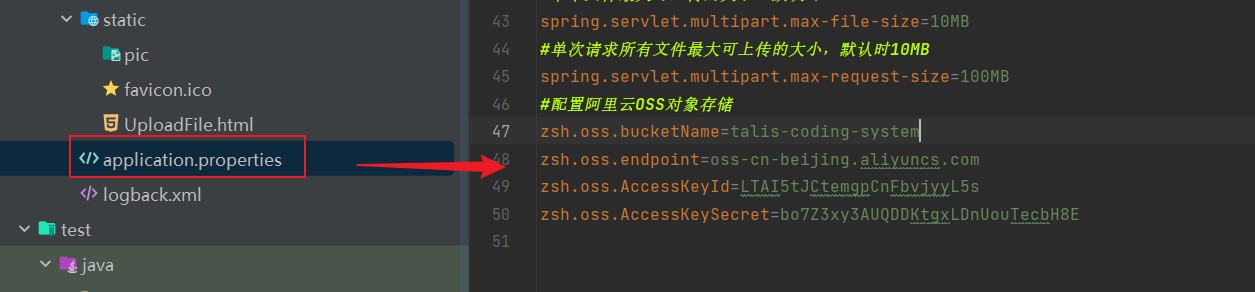
- 首先在 application.yaml 配置bucketName, endpoint, accessKeyId, accessKeySecret
- 这里利用的是 spring 的生命周期, 在 bean 实例化后,使用@PostConstruct注解 + Environment 属性 进行spring上下文环境赋值
package com.shuai.utils;import com.aliyun.oss.*;
import com.aliyun.oss.common.auth.*;
import com.aliyun.oss.model.PutObjectRequest;
import com.aliyun.oss.model.PutObjectResult;
import jakarta.annotation.PostConstruct;
import jakarta.annotation.Resource;
import java.io.ByteArrayInputStream;
import java.util.UUID;
import lombok.extern.slf4j.Slf4j;
import org.springframework.core.env.Environment;
import org.springframework.stereotype.Component;
import org.springframework.web.multipart.MultipartFile;@Component
@Slf4j
public class AliYunOssUtils {private static String bucketName;private static String endpoint;private static String accessKeyId;private static String accessKeySecret;@Resource private Environment environment;// 利用 @PostConstruct 注解,在Bean初始化后手动读取配置赋值给静态字段@PostConstructpublic void init() {bucketName = environment.getProperty("zsh.oss.bucketName");endpoint = environment.getProperty("zsh.oss.endpoint");accessKeyId = environment.getProperty("zsh.oss.AccessKeyId");accessKeySecret = environment.getProperty("zsh.oss.AccessKeySecret");System.out.println("--------------------------------------------------------");System.out.println("bucketName=" + bucketName);System.out.println("endpoint=" + endpoint);System.out.println("accessKeyId=" + accessKeyId);System.out.println("accessKeySecret=" + accessKeySecret);}public static String uploadFile(MultipartFile file) throws Exception {// 1. 获取文件的原名称String originalFilename = file.getOriginalFilename();// 2. 取出文件后缀String fileSuffix = null;if (originalFilename != null) {fileSuffix = originalFilename.substring(originalFilename.lastIndexOf("."));}// 3. 生成UUID ,拼接原文件后缀,生成新的文件名String uuId = UUID.randomUUID().toString();String newFileName = uuId + fileSuffix;// 4. 将file 转byte流byte[] content = file.getBytes();// Endpoint以华东1(杭州)为例,其它Region请按实际情况填写。endpoint = "https://" + endpoint;// 使用DefaultCredentialProvider方法直接设置AK和SKCredentialsProvider credentialsProvider =new DefaultCredentialProvider(accessKeyId, accessKeySecret);// 创建OSSClient实例。OSS ossClient = new OSSClientBuilder().build(endpoint, credentialsProvider);try {// 创建PutObjectRequest对象。PutObjectRequest putObjectRequest =new PutObjectRequest(bucketName, newFileName, new ByteArrayInputStream(content));// 创建PutObject请求。PutObjectResult result = ossClient.putObject(putObjectRequest);} catch (OSSException oe) {System.out.println("Caught an OSSException, which means your request made it to OSS, "+ "but was rejected with an error response for some reason.");System.out.println("Error Message:" + oe.getErrorMessage());System.out.println("Error Code:" + oe.getErrorCode());System.out.println("Request ID:" + oe.getRequestId());System.out.println("Host ID:" + oe.getHostId());} catch (ClientException ce) {System.out.println("Caught an ClientException, which means the client encountered "+ "a serious internal problem while trying to communicate with OSS, "+ "such as not being able to access the network.");System.out.println("Error Message:" + ce.getMessage());} finally {if (ossClient != null) {ossClient.shutdown();}}return endpoint.split("//")[0]+ "//"+ bucketName+ "."+ endpoint.split("//")[1]+ "/"+ newFileName;}
}


或重新运行容器时,丢失apt-get update问题)
)


 A-D题解)


)

)