一、概述
目前操作 Excel 比较流行的就是 Apache POI 和阿里巴巴的 easyExcel。
1.1 POI 简介
Apache POI 是用 Java 编写的免费开源的跨平台的 Java API,Apache POI 提供 API 给 Java 程序对 Microsoft Office 格式文档读和写的常用功能。POI 为 “Poor Obfuscation Implementation” 的首字母缩写,意为“简洁版的模糊实现”。其常用的结构如下:
HSSF -- 提供读写 03 版本的 Excel 常用功能。
XSSF -- 提供读写 07 版本的 Excel 常用功能。
HWPF -- 提供读写 Word 格式的常用功能
HSLF -- 提供读写 ppt 格式的常用功能。
HDGF -- 提供读写 visio 格式的常用功能
1.2 easyExcel 简介
easyExcel 是阿里巴巴开源的一个 excel 处理框架,以使用简单、节省内存著称。easyExcel 能大大减少占用内存的主要原因是在解析 Excel 时没有将文件数据一次性全部加载到内存中,而是从磁盘上一行行读取数据,逐个解析。
easyExcel 官网地址:https://github.com/alibaba/easyexcel
1.3 xls 和 xlsx 区别
常用的 excel 文档有两种结尾形式,分别为 xls 和 xlsx,其中以 xls 结尾的文档属于 03 版本的,它里面最多可以存储 65536 行数据。而以 xlsx 结尾的文档属于 07 版本的,它理论上可以存储无限行数据,这就是两者之前的区别。
二、POI 常用操作
2.1 添加 maven 依赖
<dependencies><!--xls(03 版本)--><dependency><groupId>org.apache.poi</groupId><artifactId>poi</artifactId><version>3.9</version></dependency><!--xlsx(07 版本)--><dependency><groupId>org.apache.poi</groupId><artifactId>poi-ooxml</artifactId><version>3.9</version></dependency><!-- 日期格式化工具--><dependency><groupId>joda-time</groupId><artifactId>joda-time</artifactId><version>2.10.1</version></dependency><!--test--><dependency><groupId>junit</groupId><artifactId>junit</artifactId><version>4.12</version></dependency></dependencies>2.2 写入 Excel 操作
2.2.1 一般文件写入
2.2.1.1 03 版本
import org.apache.poi.hssf.usermodel.HSSFWorkbook;
import org.apache.poi.ss.usermodel.Cell;
import org.apache.poi.ss.usermodel.Row;
import org.apache.poi.ss.usermodel.Sheet;
import org.apache.poi.ss.usermodel.Workbook;
import org.joda.time.DateTime;
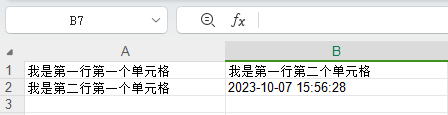
import org.junit.Test;import java.io.FileOutputStream;public class ExcelWriteTest {String PATH ="F:\\idea_home\\poi-excel\\";@Testpublic void testWrite03() throws Exception {// 1、创建一个工作簿Workbook workbook = new HSSFWorkbook();// 2、创建一个工作表Sheet sheet = workbook.createSheet("我是 sheet1 页");// 3、创建一行Row row1  = sheet.createRow(0);// 4、创建一个单元格Cell cell11 = row1.createCell(0);cell11.setCellValue("我是第一行第一个单元格");Cell cell12 = row1.createCell(1);cell12.setCellValue("我是第一行第二个单元格");// 第二行Row row2  = sheet.createRow(1);Cell cell21 = row2.createCell(0);cell21.setCellValue("我是第二行第一个单元格");Cell cell22 = row2.createCell(1);String time = new DateTime().toString("yyyy-MM-dd HH:mm:ss");cell22.setCellValue(time);// 03 版本的使用 xls 结尾FileOutputStream fileOutputStream  = new FileOutputStream(PATH+"统计表03类型.xls");workbook.write(fileOutputStream);fileOutputStream.close();System.out.println("Excel03 写入完成了");}
}
2.2.2.2 07 版本
import org.apache.poi.ss.usermodel.Cell;
import org.apache.poi.ss.usermodel.Row;
import org.apache.poi.ss.usermodel.Sheet;
import org.apache.poi.ss.usermodel.Workbook;
import org.apache.poi.xssf.usermodel.XSSFWorkbook;
import org.joda.time.DateTime;
import org.junit.Test;import java.io.FileOutputStream;public class ExcelWriteTest {String PATH ="F:\\idea_home\\poi-excel\\";@Testpublic void testWrite07() throws Exception {// 1、创建一个工作簿Workbook workbook = new XSSFWorkbook();// 2、创建一个工作表Sheet sheet = workbook.createSheet("我是 sheet1 页");// 3、创建一行Row row1  = sheet.createRow(0);// 4、创建一个单元格Cell cell11 = row1.createCell(0);cell11.setCellValue("我是第一行第一个单元格");Cell cell12 = row1.createCell(1);cell12.setCellValue("我是第一行第二个单元格");// 第二行Row row2  = sheet.createRow(1);Cell cell21 = row2.createCell(0);cell21.setCellValue("我是第二行第一个单元格");Cell cell22 = row2.createCell(1);String time = new DateTime().toString("yyyy-MM-dd HH:mm:ss");cell22.setCellValue(time);// 07 版本的使用 xlsx 结尾FileOutputStream fileOutputStream  = new FileOutputStream(PATH+"统计表07类型.xlsx");workbook.write(fileOutputStream);fileOutputStream.close();System.out.println("Excel07 写入完成了");}
}
2.2.2 大文件写入
2.2.2.1 03 版本
import org.apache.poi.hssf.usermodel.HSSFWorkbook;
import org.apache.poi.ss.usermodel.Cell;
import org.apache.poi.ss.usermodel.Row;
import org.apache.poi.ss.usermodel.Sheet;
import org.apache.poi.ss.usermodel.Workbook;
import org.junit.Test;import java.io.FileOutputStream;public class ExcelWriteTest {String PATH ="F:\\idea_home\\poi-excel\\";@Testpublic void testWrite03BigData() throws Exception {long begin = System.currentTimeMillis();// 1、创建一个工作簿Workbook workbook = new HSSFWorkbook();// 2、创建一个工作表Sheet sheet = workbook.createSheet();// 3、写入数据for(int rowNum =0;rowNum<65537;rowNum++){Row row = sheet.createRow(rowNum);for(int cellNum=0;cellNum<10;cellNum++){Cell cell = row.createCell(cellNum);cell.setCellValue(cellNum);}}System.out.println("over");FileOutputStream fileOutputStream  = new FileOutputStream(PATH+"统计表03大数据类型.xls");workbook.write(fileOutputStream);fileOutputStream.close();long end = System.currentTimeMillis();System.out.println((double)(end-begin)/1000);}
}
缺点:最多只能处理 65536 行,否则会抛出异常。
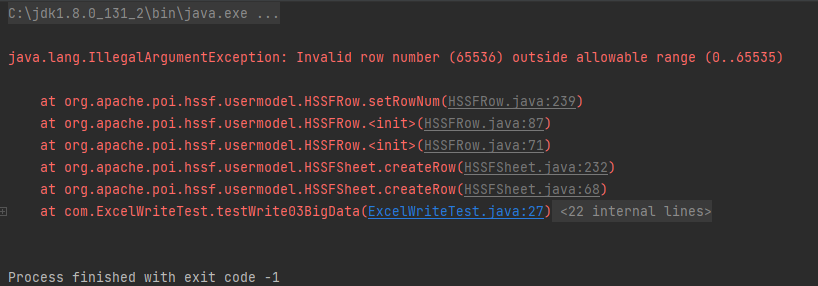
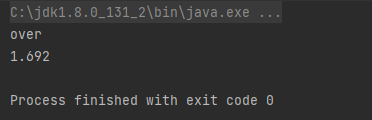
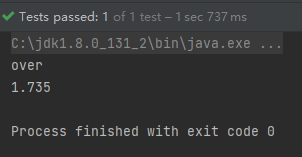
优点:写入过程中写入缓存,不操作磁盘,最后一次性写入磁盘,速度快。将 65537 改成65536 再次执行程序,结果如下,可以看到 1.692s 就完成了写入操作,速度还是很快的。
2.2.2.2 07 版本
import org.apache.poi.ss.usermodel.Cell;
import org.apache.poi.ss.usermodel.Row;
import org.apache.poi.ss.usermodel.Sheet;
import org.apache.poi.ss.usermodel.Workbook;
import org.apache.poi.xssf.usermodel.XSSFWorkbook;
import org.junit.Test;import java.io.FileOutputStream;public class ExcelWriteTest {String PATH ="F:\\idea_home\\poi-excel\\";@Testpublic void testWrite07BigData() throws Exception {long begin = System.currentTimeMillis();// 1、创建一个工作簿Workbook workbook = new XSSFWorkbook();// 2、创建一个工作表Sheet sheet = workbook.createSheet();// 3、写入数据for(int rowNum =0;rowNum<100000;rowNum++){Row row = sheet.createRow(rowNum);for(int cellNum=0;cellNum<10;cellNum++){Cell cell = row.createCell(cellNum);cell.setCellValue(cellNum);}}System.out.println("over");FileOutputStream fileOutputStream  = new FileOutputStream(PATH+"统计表07大数据类型.xlsx");workbook.write(fileOutputStream);fileOutputStream.close();long end = System.currentTimeMillis();System.out.println((double)(end-begin)/1000);}
}
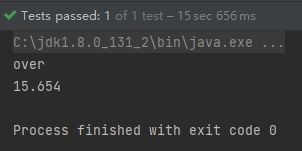
缺点:写数据时速度非常慢,非常耗内存,也会发生内存溢出,如100万条。
优点:可以写较大的数据量,如20万条。
2.2.2.3 07 版本优化
import org.apache.poi.ss.usermodel.Cell;
import org.apache.poi.ss.usermodel.Row;
import org.apache.poi.ss.usermodel.Sheet;
import org.apache.poi.ss.usermodel.Workbook;
import org.apache.poi.xssf.streaming.SXSSFWorkbook;
import org.junit.Test;import java.io.FileOutputStream;public class ExcelWriteTest {String PATH ="F:\\idea_home\\poi-excel\\";@Testpublic void testWrite07BigDataS() throws Exception {long begin = System.currentTimeMillis();// 1、创建一个工作簿Workbook workbook = new SXSSFWorkbook();// 2、创建一个工作表Sheet sheet = workbook.createSheet();// 3、写入数据for(int rowNum =0;rowNum<100000;rowNum++){Row row = sheet.createRow(rowNum);for(int cellNum=0;cellNum<10;cellNum++){Cell cell = row.createCell(cellNum);cell.setCellValue(cellNum);}}System.out.println("over");FileOutputStream fileOutputStream  = new FileOutputStream(PATH+"统计表07大数据类型优化.xlsx");workbook.write(fileOutputStream);// 清除产生的临时文件((SXSSFWorkbook)workbook).dispose();fileOutputStream.close();long end = System.currentTimeMillis();System.out.println((double)(end-begin)/1000);}
}
优点:可以写非常大的数据量,如 100万 条甚至更多条,数据速度快,占用更少的内存。
需要注意的是:代码在过程中会产生临时文件,需要清理临时文件。默认有 100 条记录被保存在内存中,如果超过这数量,则最前面的数据被写入临时文件。如果想自定义内存中数据的数量,可以使用 new SXSSFWorkbook(数量) 。
SXSSFWorkbook 来至官方的解释:实现 “BigGridDemo” 策略的流式 XSSFWorkbook 版本。这允许写入非常大的文件而不会耗尽内存,因为任何时候只有可配置的行部分被保存在内存中。请注意,仍然可能会消耗大量内存,这些内存基于您正在使用的功能,例如合并区域,注释……仍然只存储在内存中,因此如果广泛使用,可能需要大量内存。
2.3 读取 Excel 操作
2.3.1 03 版本
import org.apache.poi.hssf.usermodel.HSSFWorkbook;
import org.apache.poi.ss.usermodel.*;
import org.junit.Test;
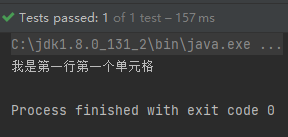
import java.io.FileInputStream;public class ExcelRead {String PATH ="F:\\idea_home\\poi-excel\\";@Testpublic void testRead03() throws Exception {// 1、获取文件流FileInputStream fileInputStream = new FileInputStream(PATH+"统计表03类型.xls");// 2、创建文件簿,使用 excel 能操作的这边都可以操作Workbook workbook = new HSSFWorkbook(fileInputStream);// 3、得到表Sheet sheet = workbook.getSheetAt(0);// 4、得到行Row row  = sheet.getRow(0);// 5、得到列Cell cell = row.getCell(0);// 读取值的时候需要注意类型,String 和数字调用的方法是不同的。System.out.println(cell.getStringCellValue());fileInputStream.close();}
}
2.3.2 07 版本
import org.apache.poi.ss.usermodel.*;
import org.apache.poi.xssf.usermodel.XSSFWorkbook;
import org.junit.Test;
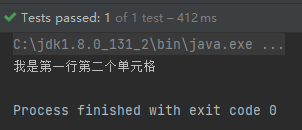
import java.io.FileInputStream;public class ExcelRead {String PATH ="F:\\idea_home\\poi-excel\\";@Testpublic void testRead07() throws Exception {// 1、获取文件流FileInputStream fileInputStream = new FileInputStream(PATH+"统计表07类型.xlsx");// 2、创建文件簿,使用 excel 能操作的这边都可以操作Workbook workbook = new XSSFWorkbook(fileInputStream);// 3、得到表Sheet sheet = workbook.getSheetAt(0);// 4、得到行Row row  = sheet.getRow(0);// 5、得到列Cell cell = row.getCell(1);// 读取值的时候需要注意类型,String 和数字调用的方法是不同的。System.out.println(cell.getStringCellValue());fileInputStream.close();}
}
2.3.3 读取不同类型
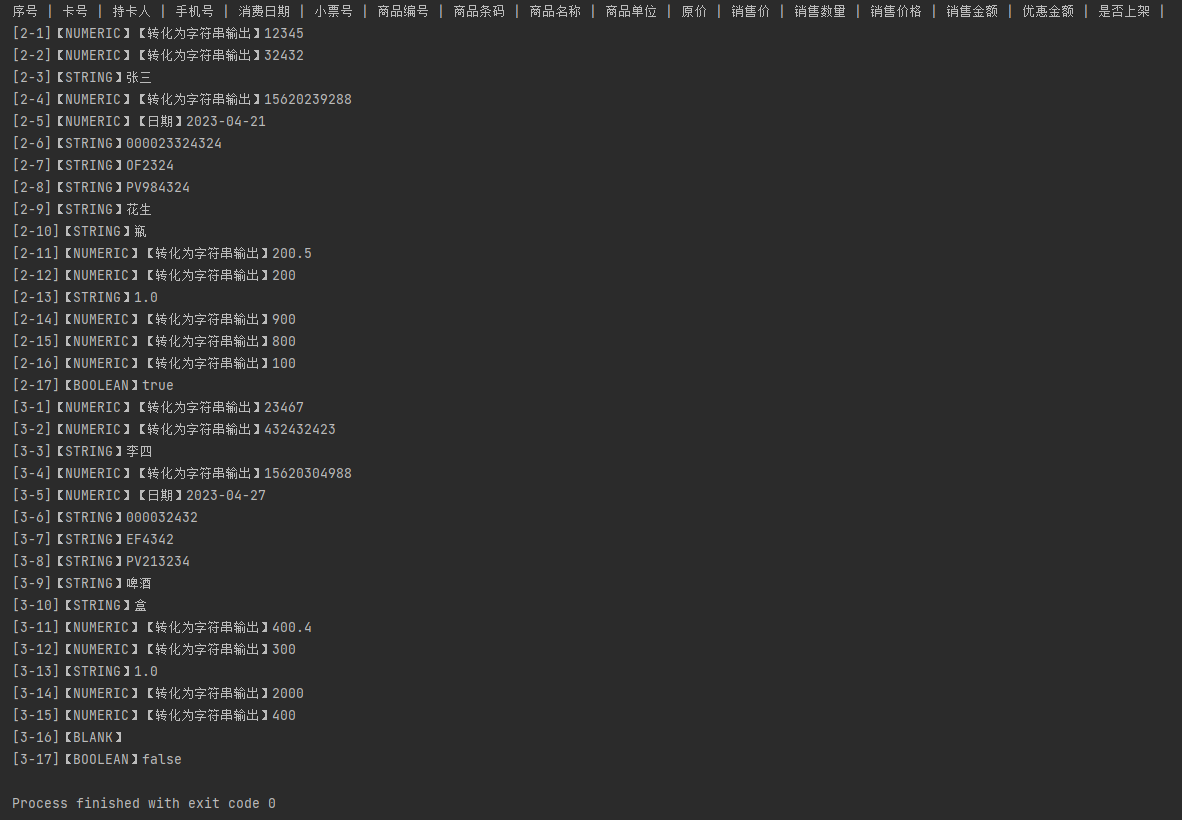
表格的内容如下所示:

代码如下所示:
import org.apache.poi.hssf.usermodel.HSSFCell;
import org.apache.poi.hssf.usermodel.HSSFDateUtil;
import org.apache.poi.hssf.usermodel.HSSFWorkbook;
import org.apache.poi.ss.usermodel.*;
import org.joda.time.DateTime;
import org.junit.Test;
import java.io.FileInputStream;
import java.util.Date;public class ExcelRead {String PATH ="F:\\idea_home\\poi-excel\\";@Testpublic void testCellType() throws Exception{// 1、获取文件流FileInputStream fileInputStream = new FileInputStream(PATH+"03商品信息.xls");// 2、创建文件簿,使用 excel 能操作的这边都可以操作Workbook workbook = new HSSFWorkbook(fileInputStream);// 3、得到表Sheet sheet = workbook.getSheetAt(0);// 4、获取标题内容Row rowTitle  = sheet.getRow(0);if(rowTitle != null){// 获取列的数量int cellCount = rowTitle.getPhysicalNumberOfCells();for(int cellNum=0;cellNum<cellCount;cellNum++){Cell cell = rowTitle.getCell(cellNum);if(cell != null){// 获取列的类型int cellType = cell.getCellType();// 获取具体的列名String cellValue = cell.getStringCellValue();System.out.print(cellValue+" | ");}}}System.out.println();// 5、获取表中的内容// 获取有多少行的记录int rowCount = sheet.getPhysicalNumberOfRows();for(int rowNum=1;rowNum<rowCount;rowNum++){// 获取第一行数据Row rowData = sheet.getRow(rowNum);if(rowData !=null){// 读取行中的列int cellCount = rowTitle.getPhysicalNumberOfCells();for(int cellNum=0;cellNum<cellCount;cellNum++){System.out.print("["+(rowNum+1)+"-"+(cellNum+1)+"]");Cell cell = rowData.getCell(cellNum);// 匹配类的数据类型if(cell != null){int cellType = cell.getCellType();String cellValue="";switch(cellType){case HSSFCell.CELL_TYPE_STRING:   //字符串System.out.print("【STRING】");cellValue = cell.getStringCellValue();break;case HSSFCell.CELL_TYPE_BOOLEAN:   //布尔System.out.print("【BOOLEAN】");cellValue = String.valueOf(cell.getBooleanCellValue());break;case HSSFCell.CELL_TYPE_BLANK:   //空System.out.print("【BLANK】");break;case HSSFCell.CELL_TYPE_NUMERIC:   //数字(分为日期和普通数字)System.out.print("【NUMERIC】");if(HSSFDateUtil.isCellDateFormatted(cell)){ // 日期System.out.print("【日期】");Date date = cell.getDateCellValue();cellValue = new DateTime(date).toString("yyyy-MM-dd");}else{// 非日期格式,转换成字符串格式System.out.print("【转化为字符串输出】");cell.setCellType(HSSFCell.CELL_TYPE_STRING);cellValue = cell.toString();}break;case HSSFCell.CELL_TYPE_ERROR:   //字符串System.out.print("【数据类型错误】");break;}System.out.println(cellValue);}}}}fileInputStream.close();}
}
2.3.4 读取公式
操作的表格内容如下所示:
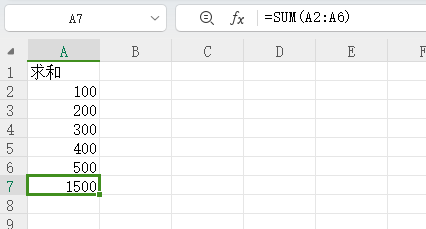
代码如下所示:
import org.apache.poi.hssf.usermodel.HSSFFormulaEvaluator;
import org.apache.poi.hssf.usermodel.HSSFWorkbook;
import org.apache.poi.ss.usermodel.*;
import org.junit.Test;
import java.io.FileInputStream;public class ExcelRead {String PATH ="F:\\idea_home\\poi-excel\\";@Testpublic void testFormula() throws Exception {FileInputStream fileInputStream = new FileInputStream(PATH + "03求和.xls");// 1.创建一个工作簿。使得excel能操作的,这边他也能操作。Workbook workbook = new HSSFWorkbook(fileInputStream);// 2.得到表。Sheet sheet = workbook.getSheetAt(0);Row row = sheet.getRow(6);Cell cell = row.getCell(0);// 拿到计算公司FormulaEvaluator formulaEvaluator = new HSSFFormulaEvaluator((HSSFWorkbook) workbook);// 输出单元格内容int cellType = cell.getCellType();switch (cellType){case Cell.CELL_TYPE_FORMULA:String cellFormula = cell.getCellFormula();System.out.println(cellFormula);// 计算CellValue evaluate = formulaEvaluator.evaluate(cell);String cellValue = evaluate.formatAsString();System.out.println(cellValue);break;}}
}
三、EasyExcel 常用操作
3.1 添加 maven 依赖
<dependencies><!-- 主要是这个依赖,剩下的依赖都是测试用到的 --><dependency><groupId>com.alibaba</groupId><artifactId>easyexcel</artifactId><version>3.0.5</version></dependency><dependency><groupId>lambada</groupId><artifactId>lambada</artifactId><version>1.0.3</version></dependency><dependency><groupId>org.projectlombok</groupId><artifactId>lombok</artifactId><version>RELEASE</version><scope>compile</scope></dependency><!--test--><dependency><groupId>junit</groupId><artifactId>junit</artifactId><version>4.12</version></dependency><dependency><groupId>com.alibaba</groupId><artifactId>fastjson</artifactId><version>1.2.7</version></dependency></dependencies>3.2 写操作
先模拟一个实体类,如下所示:
import com.alibaba.excel.annotation.ExcelIgnore;
import com.alibaba.excel.annotation.ExcelProperty;
import lombok.EqualsAndHashCode;
import lombok.Getter;
import lombok.Setter;import java.util.Date;@Getter
@Setter
@EqualsAndHashCode
public class DemoData {@ExcelProperty("字符串标题")private String string;@ExcelProperty("日期标题")private Date date;@ExcelProperty("数字标题")private Double doubleData;/*** 忽略这个字段*/@ExcelIgnoreprivate String ignore;
}
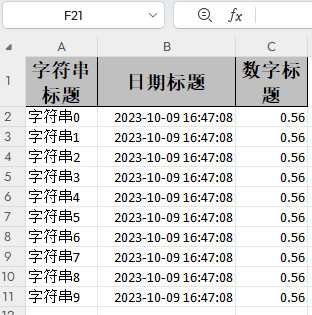
然后写入文档即可,如下所示:
import com.alibaba.excel.EasyExcel;
import com.alibaba.excel.util.ListUtils;
import org.junit.Test;import java.util.Date;
import java.util.List;public class TestWrite {@Testpublic void simpleWrite() {String PATH ="F:\\idea_home\\poi-excel\\easyexcel统计表03类型.xlsx";EasyExcel.write(PATH, DemoData.class).sheet("模板").doWrite(() -> {// 分页查询数据return data();});}private List<DemoData> data() {List<DemoData> list = ListUtils.newArrayList();for (int i = 0; i < 10; i++) {DemoData data = new DemoData();data.setString("字符串" + i);data.setDate(new Date());data.setDoubleData(0.56);list.add(data);}return list;}
}
3.3 读操作
import lombok.EqualsAndHashCode;
import lombok.Getter;
import lombok.Setter;import java.util.Date;@Getter
@Setter
@EqualsAndHashCode
public class DemoData {private String string;private Date date;private Double doubleData;
}
import com.alibaba.excel.EasyExcel;
import com.alibaba.excel.read.listener.PageReadListener;
import com.alibaba.fastjson.JSON;
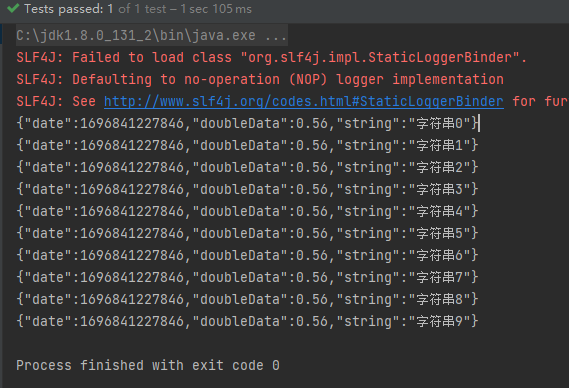
import org.junit.Test;public class TestRead {@Testpublic void simpleRead() {String PATH ="F:\\idea_home\\poi-excel\\easyexcel统计表03类型.xlsx";// 这里 需要指定读用哪个class去读,然后读取第一个sheet 文件流会自动关闭// 这里每次会读取3000条数据 然后返回过来 直接调用使用数据就行EasyExcel.read(PATH, DemoData.class, new PageReadListener<DemoData>(dataList -> {for (DemoData demoData : dataList) {System.out.println(JSON.toJSONString(demoData));}})).sheet().doRead();}
}
3.4 更多操作
详细的文档地址:https://www.yuque.com/easyexcel/doc/easyexcel


