Binder 是 Android 系统中主要的 IPC 通信方式,其性能非常优异。但是包括我在内的很多开发者都对它望而却步,确实比较难,每次都是看了忘,忘了看,但是随着工作的时间约来越长,每次看也都对 Binder 有新的认识,所以这次把自己的一些认识记录一下。
从 Framework/Driver 来看 Binder

Binder 设计是经典的 C/S 架构,Client 向 Server 主动请求,Server 收到消息后回复,一个 Server 可以服务多个 Client,Server 不能主动向 Client 发送消息。
所有的进程启动都会通过 bind_open 打开 binder 驱动,通过 mmap 完成内存映射,不同的进程在打开驱动后,binder 驱动会为其创建一个 binder_proc 节点来表示该进程,当该进程有新的 Server 时,就会在 binder_proc 中添加一个 binder_node 来表示这个服务,当该进程想要向别的进程的 Server 通信时,在 binder_proc 中添加一个 binder_ref (其中包含 handle, 这个值是在同一个进程中依次增加,不同进程中的同一服务的handle 也是不一样的, ServiceManager 的 handle 是个例外,它固定为 0) 来描述对目标 Server 的引用,binder_proc, binder_node 和 binder_ref 他们都是以链表的形式存储。
ServiceManager
Server 的管理是通过 ServiceManager 的,他自己也是一个 binder 的 Server,其他服务如果要添加,需要通过它的 addService 方法,如果要获取需要通过它的 getService 方法,我们也针对这两个方法分析。
当一个进程想要将注册 Server 时,会通过 binder IPC 通信的方式调用 ServiceManager 的 addService 方法,参数中也会包含 Server,这个 Server 会先到达 binder 驱动,驱动会去检查这个进程中是不是有这个服务对应的 binder_node,由于是第一次,这个服务是没有的,然后驱动会在对应的 binder_proc 上创建一个 binder_node 来表示这个服务, binder 驱动需要把这个 Server 通知给 ServiceManager 所在的进程,但是不能直接用对应的 binder_node, 而需要在 ServiceManager 对应的 binder_proc 上添加一个 binder_ref 来指向那个 Binder Server,而 binder_ref(包含 handle) 就可以返回给 ServiceManager 对应的进程,ServiceManager 进程中会记录这个 Server 的名字和 handle 等信息。这就完成了一个服务的添加。
当一个进程想要与某个 Server 通信时,会通过 binder IPC 通信的方式调用 ServiceManager 的 getService 方法,这个方法的参数中包含这个服务的名字(字符串),这个请求通过 binder IPC 到达 ServiceManager 所在的进程后,会通过这个名字去查找对应的 Server, 找到了这个服务就会把这个服务的通过 binder IPC 回复给目标进程,前面说过 ServieManager 进程中保存的只是一个 binder_ref (handle) 引用,当 binder 驱动收到这个回复后,会去通过这个引用获取 Server 对应的 binder_node,驱动会去比较发送进程和接收进程,在 ServiceManager 回复的这个逻辑中,发送进程是 ServiceManager,接收进程是获取这个服务的进程,他们肯定不一样,前面也说到,就算同一个 Server 的 binder_ref 在不同的进程中也是不一样的,所以 ServiceManager 进程中的 binder_ref 不能直接给获取这个服务的进程使用,就需要给获取服务的这个进程再创建一个 binder_ref,同时这个 binder_ref 也是指向目标 Server 的 binder_node,然后把这个 binder_ref (handle) 返回给请求服务的进程就好了,后续和 Server 的通信也都全部仰仗这个 binder_ref(handle) 了。
前面说到 ServiceManager 也是一个 binder 的 Server,无论是添加 Server 还是获取 Server 都要通过它,我们的进程要与 ServiceManager 通信必须要对应的 handle,但是我们要怎么获取这个 handle 呢?这里 binder 留了一个后门,ServcieManager 的 handle 对所有的进程都一样,都是 0,所以不用获取,直接用就好了。
Binder 高速的秘密
在上面说到进程启动时会调用 binder 的 bind_open 和 mmap 方法,其中 mmap 流程就是速度快的原因。通过 mmap 在通信的过程中只会有一次用户空间和内核空间的数据拷贝,其他的 IPC 通信方式大多都有 2 次或者更多。
在 mmap 中 binder 会为进程分配一块物理内存,binder 和 Server 的虚拟内存都会指向这块内存,也就是这块物理内存是他们共用的。当 Client 发送消息给 Server 时,Binder 会将 Client 发送过来的消息拷贝到 mmap 分配的内存中,然后 binder 通知 Server 去使用,Server 处理完成后把回复的消息也写入这块内存,通知 binder 回复 Client,binder 将回复的消息再拷贝到 Client 所在的进程,回复 Client 完成调用。这块内存空间的最大值为 1MB - 8KB。
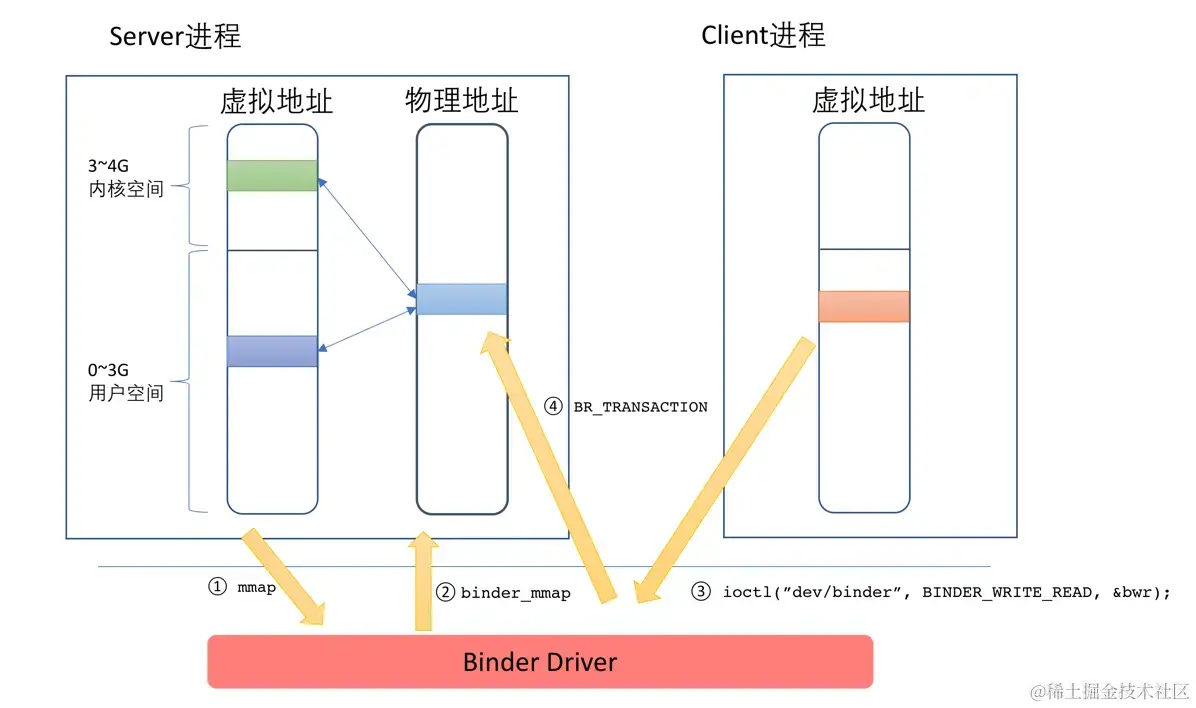
Binder IPC 通信过程
通信过程中需要有一些协议,这里来描述一下不同的协议,协议通常分为控制协议和驱动协议。
控制协议是其他进程通过 ioctl(“/dev/binder”) 方法向驱动发送命令,其中包括以下几种:
| 命令 | 说明 | 参数类型 |
|---|---|---|
| BINDER_WRITE_READ | 读写操作,最常用的命令。IPC过程就是通过这个命令进行数据传递 | binder_write_read |
| BINDER_SET_MAX_THREADS | 设置进程支持的最大线程数量 | size_t |
| BINDER_SET_CONTEXT_MGR | 设置自身为ServiceManager | 无 |
| BINDER_THREAD_EXIT | 通知驱动Binder线程退出 | 无 |
| BINDER_VERSION | 获取Binder驱动的版本号 | binder_version |
驱动协议包括以下两种进程发送给驱动的协议(binder_driver_command_protocol)和驱动发送给进程的协议(binder_driver_return_protocol)。
binder_driver_command_protocol:
| 命令 | 说明 | 参数类型 |
|---|---|---|
| BC_TRANSACTION | Binder事务,即:Client对于Server的请求 | binder_transaction_data |
| BC_REPLY | 事务的应答,即:Server对于Client的回复 | binder_transaction_data |
| BC_FREE_BUFFER | 通知驱动释放Buffer | binder_uintptr_t |
| BC_ACQUIRE | 强引用计数+1 | __u32 |
| BC_RELEASE | 强引用计数-1 | __u32 |
| BC_INCREFS | 弱引用计数+1 | __u32 |
| BC_DECREFS | 弱引用计数-1 | __u32 |
| BC_ACQUIRE_DONE | BR_ACQUIRE的回复 | binder_ptr_cookie |
| BC_INCREFS_DONE | BR_INCREFS的回复 | binder_ptr_cookie |
| BC_ENTER_LOOPER | 通知驱动主线程ready | void |
| BC_REGISTER_LOOPER | 通知驱动子线程ready | void |
| BC_EXIT_LOOPER | 通知驱动线程已经退出 | void |
| BC_REQUEST_DEATH_NOTIFICATION | 请求接收死亡通知 | binder_handle_cookie |
| BC_CLEAR_DEATH_NOTIFICATION | 去除接收死亡通知 | binder_handle_cookie |
| BC_DEAD_BINDER_DONE | 已经处理完死亡通知 | binder_uintptr_t |
binder_driver_return_protocol:
| 返回类型 | 说明 | 参数类型 |
|---|---|---|
| BR_OK | 操作完成 | void |
| BR_NOOP | 操作完成 | void |
| BR_ERROR | 发生错误 | __s32 |
| BR_TRANSACTION | 通知进程收到一次Binder请求(Server端) | binder_transaction_data |
| BR_REPLY | 通知进程收到Binder请求的回复(Client) | binder_transaction_data |
| BR_TRANSACTION_COMPLETE | 驱动对于接受请求的确认回复 | void |
| BR_FAILED_REPLY | 告知发送方通信目标不存在 | void |
| BR_SPAWN_LOOPER | 通知Binder进程创建一个新的线程 | void |
| BR_ACQUIRE | 强引用计数+1请求 | binder_ptr_cookie |
| BR_RELEASE | 强引用计数-1请求 | binder_ptr_cookie |
| BR_INCREFS | 弱引用计数+1请求 | binder_ptr_cookie |
| BR_DECREFS | 弱引用计数-1请求 | binder_ptr_cookie |
| BR_DEAD_BINDER | 发送死亡通知 | binder_uintptr_t |
| BR_CLEAR_DEATH_NOTIFICATION_DONE | 清理死亡通知完成 | binder_uintptr_t |
| BR_DEAD_REPLY | 告知发送方对方已经死亡 | void |
在上面介绍了一些命令后,你可能还是不怎么清楚具体怎么通信的,我这里描述一次简单的 binder IPC 通信:
Client 通过 ServiceManager 获取到目标 Server 的 handle 后,底层调用 ioctl 方法,对应的 ioctl 命令是 BINDER_WRITE_READ,其中还传递了发送给服务端的包裹的数据,也包含了 binder 驱动命令, 这个命令是 BC_TRANSACTION,binder 驱动收到后会向 Client 线程回复 BR_TRANSACTION_COMPLETE 表示已经收到请求,binder 驱动会将 Client 传递过来的数据拷贝到对应 Server 的 mmap 内存空间,然后向 Server 发送 BR_TRANSACTION 命令,表示有新的 Client 请求,Server 会读取对应存在 mmap 中的 Client 请求数据,然后解析请求内容,Server 完成请求后,会把返回的数据封装在 reply 中,然后同样通过 ioctl 的 BINDER_WRITE_READ 命令封装回复的数据和驱动指令,驱动指令是 BC_REPLY,binder 驱动收到后会向 Server 发送 BR_TRANSACTION_COMPLETE 命令,表示已经收到给 Client 的回复,在 binder 驱动中会将 Server 的回复数据拷贝到 Client 所在的进程,然后向 Client 发送 BR_REPLY 表示请求成功,Client 最后解析出 Server 发送来的数据,这样就完成了一次请求。
在 Android 中 Client 和 Server 对象的命名通常有有以下规律:
| - | C/C++ | Java | AIDL |
|---|---|---|---|
| Server | BnXXX | XXXNative | IXXX.Stub |
| Client | BpXXX | XXXProxy | IXXX.Stub.Proxy |
从 Service 和 AIDL 来看 binder
Android 中官方提供的唯一使用 binder 的接口就是使用四大组件之一的 Service 了,在 onBind() 回调中返回 Binder 的 Server,客户端启动 Service 的方式修改成 bindService(),其中 Service 中的 Binder 的 Server 准备就绪后会传给启动进程的 Connection 回调,当然启动进程收到的 IBinder 对象只是一个代理而已。
Android 为了让开发者能够更容易地使用 binder,创造了 AIDL 这语言,应用在编译时,编译器会把我们声明的 AIDL 文件编译成 Java 源码文件,通过生成的源码文件我们能够像在调用本地方法代码一样调用其他进程的 Server,当然实际上是使用的 binder IPC。有人说 AIDL 是一种 IPC 的通信方式,我反正感觉怪怪的,它只是简化了 binder 的使用,而不是一种通信方式,binder 才是它的通信方式。
AIDL
这里简单描述一下 AIDL 特殊的关键字:
-
oneway
标记到方法中,表明这个方法只需要发送数据给Server,而不需要Server的回复(前面说到Client发送数据给Server后,需要等待Server再返回数据给Client,这只是一般情况。);通常这样的话方法的调用耗时就更短,有人把这个说成是异步调用,合理地使用oneway能够提高程序的性能. -
in
标记到方法参数中,表明这个参数只是当输入发送给Server,当服务端修改这个对象里面的参数后不会同步到Client。 -
out
标记到方法参数中,表明这个参数只是当输出发送给Server,Server会把返回结果写入到这个对象的参数里,写入后会同步到Client。 -
inout
标记到方法参数中,也就是同时满足in和out的特点。
后续我就通过一个 AIDL 例子来介绍一下。
这是我的 AIDL 文件:
interface IPlayingMusicService {PlayingMusicModel getPlayingMusicModel();void pause();void stop();void start();void addProgressCallback(MusicPlayingCallback callback);void removeProgressCallback(long callbackId);void newPlayingMusicModel(PlayingMusicModel newMusic);
}
除了 Java 中的 8 种基本类型、String 和 Binder 以外,其他的使用到的对象都要实现 Parcelable 接口,这也很好理解,跨进程传输数据肯定需要序列化和反序列化了。
用到的对象需要用 AIDL 文件描述下:
package com.example.aidldemo;
parcelable PlayingMusicModel;
总的来说 AIDL 就是定义了一堆服务的接口,我们来看看它生成的 Java 源码:
public interface IPlayingMusicService extends android.os.IInterface
{// ...public static abstract class Stub extends android.os.Binder implements com.example.aidldemo.IPlayingMusicService{private static final java.lang.String DESCRIPTOR = "com.example.aidldemo.IPlayingMusicService";/** Construct the stub at attach it to the interface. */public Stub(){this.attachInterface(this, DESCRIPTOR);}/*** Cast an IBinder object into an com.example.aidldemo.IPlayingMusicService interface,* generating a proxy if needed.*/public static com.example.aidldemo.IPlayingMusicService asInterface(android.os.IBinder obj){if ((obj==null)) {return null;}android.os.IInterface iin = obj.queryLocalInterface(DESCRIPTOR);if (((iin!=null)&&(iin instanceof com.example.aidldemo.IPlayingMusicService))) {return ((com.example.aidldemo.IPlayingMusicService)iin);}return new com.example.aidldemo.IPlayingMusicService.Stub.Proxy(obj);}@Override public android.os.IBinder asBinder(){return this;}@Override public boolean onTransact(int code, android.os.Parcel data, android.os.Parcel reply, int flags) throws android.os.RemoteException{ // ..}private static class Proxy implements com.example.aidldemo.IPlayingMusicService{private android.os.IBinder mRemote;Proxy(android.os.IBinder remote){mRemote = remote;}@Override public android.os.IBinder asBinder(){return mRemote;}public java.lang.String getInterfaceDescriptor(){return DESCRIPTOR;}@Override public com.example.aidldemo.PlayingMusicModel getPlayingMusicModel() throws android.os.RemoteException{// ...}@Override public void pause() throws android.os.RemoteException{// ...}@Override public void stop() throws android.os.RemoteException{// ...}@Override public void start() throws android.os.RemoteException{// ...}@Override public void addProgressCallback(com.example.aidldemo.MusicPlayingCallback callback) throws android.os.RemoteException{// ...}@Override public void removeProgressCallback(long callbackId) throws android.os.RemoteException{// ...}@Override public void newPlayingMusicModel(com.example.aidldemo.PlayingMusicModel newMusic) throws android.os.RemoteException{// ...}public static com.example.aidldemo.IPlayingMusicService sDefaultImpl;}static final int TRANSACTION_getPlayingMusicModel = (android.os.IBinder.FIRST_CALL_TRANSACTION + 0);static final int TRANSACTION_pause = (android.os.IBinder.FIRST_CALL_TRANSACTION + 1);static final int TRANSACTION_stop = (android.os.IBinder.FIRST_CALL_TRANSACTION + 2);static final int TRANSACTION_start = (android.os.IBinder.FIRST_CALL_TRANSACTION + 3);static final int TRANSACTION_addProgressCallback = (android.os.IBinder.FIRST_CALL_TRANSACTION + 4);static final int TRANSACTION_removeProgressCallback = (android.os.IBinder.FIRST_CALL_TRANSACTION + 5);static final int TRANSACTION_newPlayingMusicModel = (android.os.IBinder.FIRST_CALL_TRANSACTION + 6);public static boolean setDefaultImpl(com.example.aidldemo.IPlayingMusicService impl) {// Only one user of this interface can use this function// at a time. This is a heuristic to detect if two different// users in the same process use this function.if (Stub.Proxy.sDefaultImpl != null) {throw new IllegalStateException("setDefaultImpl() called twice");}if (impl != null) {Stub.Proxy.sDefaultImpl = impl;return true;}return false;}public static com.example.aidldemo.IPlayingMusicService getDefaultImpl() {return Stub.Proxy.sDefaultImpl;}}public com.example.aidldemo.PlayingMusicModel getPlayingMusicModel() throws android.os.RemoteException;public void pause() throws android.os.RemoteException;public void stop() throws android.os.RemoteException;public void start() throws android.os.RemoteException;public void addProgressCallback(com.example.aidldemo.MusicPlayingCallback callback) throws android.os.RemoteException;public void removeProgressCallback(long callbackId) throws android.os.RemoteException;public void newPlayingMusicModel(com.example.aidldemo.PlayingMusicModel newMusic) throws android.os.RemoteException;
}
IPlayingMusicService 是一个接口,也就是我们在 AIDL 中定义的那些方法,除此之外其中的静态类 Stub 和 Stub.Proxy 他们占据了大部分的篇幅,Stub 其实就是表示 binder 的 Server,Stub.Proxy 就是 binder 的 Client,他们也都添加了 IPlayingMusicService 接口,Stub.Proxy 是个普通类,已经把接口实现好了,Stub 是一个抽象类 IplayingMusicService 的接口需要我们自己实现,这也很好理解,Server 的这些方法当然需要我们自己去定义了,Client 当然不用在定义了,因为它最终就是会调用 Server 中的这些方法。
我们自己的 Server 实现就类似以下代码:
val binder: IBinder = object : IPlayingMusicService.Stub() {override fun pause() { // TODO:}override fun newPlayingMusicModel(newMusic: PlayingMusicModel) {// TODO:}override fun start() { // TODO:}override fun stop() { // TODO:}override fun getPlayingMusicModel(): PlayingMusicModel? {// TODO:}override fun addProgressCallback(callback: MusicPlayingCallback?) {// TODO:}override fun removeProgressCallback(callbackId: Long) {// TODO:}}
然后我们需要把这个对象在四大组建之一的 Service 的 onBind 回调中返回给系统:
// ...
override fun onBind(intent: Intent?): IBinder = binder
// ...
这个 Server 会通过 binder 转到 AMS,然后通过 AMS 再通过 binder 传递到启动的进程。
也就是回到以下回调:
bindService(Intent(this@MainActivity, MusicPlayingService::class.java),object : ServiceConnection {override fun onServiceConnected(name: ComponentName?, service: IBinder?) {val binderProxy = IPlayingMusicService.Stub.asInterface(service)}override fun onServiceDisconnected(name: ComponentName?) {}},Context.BIND_AUTO_CREATE
)
回调中的 IBinder 对象是其一个代理对象,也就是前面提到的 handler 封装过的对象。我们会使用 IPlayingMusicService.Stub.asInterface 方法把 IBinder 对象封装成拥有 IPlyaingMusicService 接口的对象。我们去看看这个方法的实现:
public static com.example.aidldemo.IPlayingMusicService asInterface(android.os.IBinder obj){if ((obj==null)) {return null;}android.os.IInterface iin = obj.queryLocalInterface(DESCRIPTOR);if (((iin!=null)&&(iin instanceof com.example.aidldemo.IPlayingMusicService))) {return ((com.example.aidldemo.IPlayingMusicService)iin);}return new com.example.aidldemo.IPlayingMusicService.Stub.Proxy(obj);}
这里很重要他首先会调用 IBinder 的 queryLocalInterface 方法去查询一下这个服务是否在当前进程中,如果不为空就是表示在当前进程中,然后会直接使用,其实这个对象就是 onBind() 中的那个 Server 对象,也就是 Stub 对象,也就是说直接拿那个对象调用方法,也就没有通过 binder 进行 IPC 通信,就和普通的对象调用没有区别;但是如果 queryLocalInterface 方法返回为空,表示这个 Server 是别的进程中的,这时会生成一个 Stub.Proxy 对象,通过这个对象的方法调用就是通过 binder IPC 实现的。
我们看看 Stub.Proxy 对象中的 newPlayingMusicModel 方法实现(其他方法也大同小异):
@Override public void newPlayingMusicModel(com.example.aidldemo.PlayingMusicModel newMusic) throws android.os.RemoteException
{android.os.Parcel _data = android.os.Parcel.obtain();android.os.Parcel _reply = android.os.Parcel.obtain();try {_data.writeInterfaceToken(DESCRIPTOR);if ((newMusic!=null)) {_data.writeInt(1);newMusic.writeToParcel(_data, 0);}else {_data.writeInt(0);}boolean _status = mRemote.transact(Stub.TRANSACTION_newPlayingMusicModel, _data, _reply, 0);if (!_status && getDefaultImpl() != null) {getDefaultImpl().newPlayingMusicModel(newMusic);return;}_reply.readException();}finally {_reply.recycle();_data.recycle();}
}
使用的是 Parcel 来传输数据,首先写入一个 Token 来表示这个请求,我这里的 demo 就是 com.example.aidldemo.IPlayingMusicService,然后在把参数写入,然后调用 mRemote (这个就是 bindServer 传过来的 IBinder 对象) 的 transact 方法来发送数据,这里还通过 TRANSACTION_newPlayingMusicModel 标记了要请求的方法,Server 回复的数据放在 _reply 中,这个 transact 方法最后也会走到上面说过的 ioctl 方法,命令是 BINDER_WRITE_READ,由于上面已经描述过了,就不再多说,等待 Server 回复后检查是否有异常,然后解析返回结果。(我的这个方法返回为 void,所以不用解析)
我们继续来看服务端 Stub 是怎么来处理这个 Stub.Proxy 发送过来的消息的,处理的入口函数是 onTransact 方法:
// ...
case TRANSACTION_newPlayingMusicModel:
{data.enforceInterface(descriptor);com.example.aidldemo.PlayingMusicModel _arg0;if ((0!=data.readInt())) {_arg0 = com.example.aidldemo.PlayingMusicModel.CREATOR.createFromParcel(data);}else {_arg0 = null;}this.newPlayingMusicModel(_arg0);reply.writeNoException();return true;
}
// ...
首先根据 Code 来判断调用的哪个方法,然后校验 Token,继续解析 Stub.Proxy 传递过来的参数,最后调用我们自己实现的 newPlayingMusicModel 方法,再将返回结果写入到 reply 中(我们这个方法没有返回值)。
到此我们就跑通了整个 AIDL 通信的流程。
AIDL Demo
Binder 对象在 Framework 中如何传递到调用方
我们的 Service#onBind 回调对象 Binder 会在 ActivityThread 的 handBindService 方法中被调用:
private void handleBindService(BindServiceData data) {Service s = mServices.get(data.token);if (s != null) {try {data.intent.setExtrasClassLoader(s.getClassLoader());data.intent.prepareToEnterProcess();if (!data.rebind) {IBinder binder = s.onBind(data.intent);ActivityManagerNative.getDefault().publishService(data.token, data.intent, binder);} else {s.onRebind(data.intent);ActivityManagerNative.getDefault().serviceDoneExecuting(data.token, SERVICE_DONE_EXECUTING_ANON, 0, 0);}ensureJitEnabled();} catch (Exception e) {...}}
}
我们看到把我们的 binder 传递给 ActivityManagerNative 的 publishService 方法,其实 ActivityManagerNative 也是一个 binder 代理,而这个 Server 也就是大名鼎鼎的 ActivityManagerService (AMS), 后续的处理也就到了系统进程。
public void publishService(IBinder token, Intent intent, IBinder service) {...synchronized(this) {if (!(token instanceof ServiceRecord)) {throw new IllegalArgumentException("Invalid service token");}mServices.publishServiceLocked((ServiceRecord)token, intent, service);}
}
void publishServiceLocked(ServiceRecord r, Intent intent, IBinder service) {final long origId = Binder.clearCallingIdentity();try {if (r != null) {Intent.FilterComparison filter = new Intent.FilterComparison(intent);IntentBindRecord b = r.bindings.get(filter);if (b != null && !b.received) {b.binder = service;b.requested = true;b.received = true;for (int conni=r.connections.size()-1; conni>=0; conni--) {ArrayList<ConnectionRecord> clist = r.connections.valueAt(conni);for (int i=0; i<clist.size(); i++) {ConnectionRecord c = clist.get(i);if (!filter.equals(c.binding.intent.intent)) {continue;}try {c.conn.connected(r.name, service);} catch (Exception e) {...}}}}serviceDoneExecutingLocked(r, mDestroyingServices.contains(r), false);}} finally {Binder.restoreCallingIdentity(origId);}
}
我们看到调用了 Connection 的 connected 方法,其实这个 conn 也是一个 binder 的代理,真正的 Server 实现是调用的 bindService 的进程,也就由 AMS 又传递到了调用的进程。实现 conn 的 Server 代码:
private static class InnerConnection extends IServiceConnection.Stub {final WeakReference<LoadedApk.ServiceDispatcher> mDispatcher;InnerConnection(LoadedApk.ServiceDispatcher sd) {mDispatcher = new WeakReference<LoadedApk.ServiceDispatcher>(sd);}public void connected(ComponentName name, IBinder service) throws RemoteException {LoadedApk.ServiceDispatcher sd = mDispatcher.get();if (sd != null) {sd.connected(name, service); }}
}
最后调用到我们的回调:
public void doConnected(ComponentName name, IBinder service) {ServiceDispatcher.ConnectionInfo old;ServiceDispatcher.ConnectionInfo info;synchronized (this) {if (mForgotten) {return;}old = mActiveConnections.get(name);if (old != null && old.binder == service) {return;}if (service != null) {mDied = false;info = new ConnectionInfo();info.binder = service;//创建死亡监听对象info.deathMonitor = new DeathMonitor(name, service);try {//建立死亡通知service.linkToDeath(info.deathMonitor, 0);mActiveConnections.put(name, info);} catch (RemoteException e) {mActiveConnections.remove(name);return;}} else {mActiveConnections.remove(name);}if (old != null) {old.binder.unlinkToDeath(old.deathMonitor, 0);}}if (old != null) {mConnection.onServiceDisconnected(name);}if (service != null) {//回调用户定义的ServiceConnection()mConnection.onServiceConnected(name, service);}
}
所以这个 Binder 由服务所在的进程 -> AMS -> 调用所在的进程,这个过程中没有经过 ServiceManager 进行注册哦。
Android 学习笔录
Android Framework底层原理篇:https://qr18.cn/AQpN4J
Android 性能优化篇:https://qr18.cn/FVlo89
Android 车载篇:https://qr18.cn/F05ZCM
Android 逆向安全学习笔记:https://qr18.cn/CQ5TcL
Android 音视频篇:https://qr18.cn/Ei3VPD
Jetpack全家桶篇(内含Compose):https://qr18.cn/A0gajp
OkHttp 源码解析笔记:https://qr18.cn/Cw0pBD
Kotlin 篇:https://qr18.cn/CdjtAF
Gradle 篇:https://qr18.cn/DzrmMB
Flutter 篇:https://qr18.cn/DIvKma
Android 八大知识体:https://qr18.cn/CyxarU
Android 核心笔记:https://qr21.cn/CaZQLo
Android 往年面试题锦:https://qr18.cn/CKV8OZ
2023年最新Android 面试题集:https://qr18.cn/CgxrRy
Android 车载开发岗位面试习题:https://qr18.cn/FTlyCJ
音视频面试题锦:https://qr18.cn/AcV6Ap


)


