一、子图绘制
# 上节课复习
import pandas as pd
import matplotlib.pyplot as plt
s='../../data/unrate.csv'unrate = pd.read_csv(s)
unrate['DATE'] = pd.to_datetime(unrate['DATE'])
first_twelve = unrate[0:12]
first_twelve
| DATE | VALUE | |
|---|---|---|
| 0 | 1948-01-01 | 3.4 |
| 1 | 1948-02-01 | 3.8 |
| 2 | 1948-03-01 | 4.0 |
| 3 | 1948-04-01 | 3.9 |
| 4 | 1948-05-01 | 3.5 |
| 5 | 1948-06-01 | 3.6 |
| 6 | 1948-07-01 | 3.6 |
| 7 | 1948-08-01 | 3.9 |
| 8 | 1948-09-01 | 3.8 |
| 9 | 1948-10-01 | 3.7 |
| 10 | 1948-11-01 | 3.8 |
| 11 | 1948-12-01 | 4.0 |
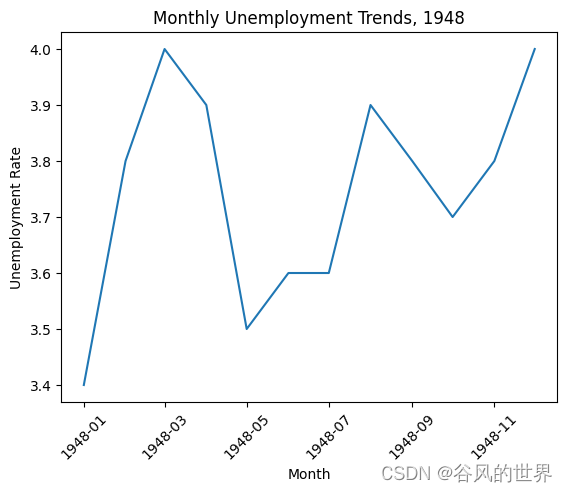
plt.plot(first_twelve['DATE'], first_twelve['VALUE'])
plt.xticks(rotation=45)
plt.xlabel('Month')
plt.ylabel('Unemployment Rate')
plt.title('Monthly Unemployment Trends, 1948')
plt.show()
#add_subplot(first,second,index) first means number of Row,second means number of Column.import matplotlib.pyplot as plt
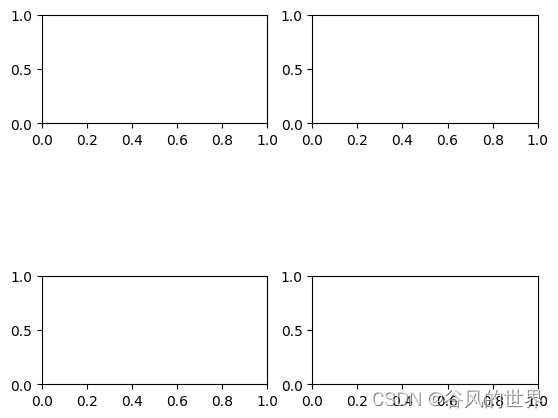
fig = plt.figure()
ax1 = fig.add_subplot(3,2,1)
ax2 = fig.add_subplot(3,2,2)
ax4=fig.add_subplot(3,2,5)
ax3 = fig.add_subplot(3,2,6)
plt.show()
import numpy as np
#fig = plt.figure()
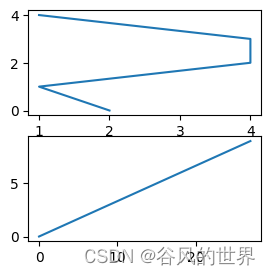
fig = plt.figure(figsize=(3, 3))
ax1 = fig.add_subplot(2,1,1)
ax2 = fig.add_subplot(2,1,2)ax1.plot(np.random.randint(1,5,5), np.arange(5))
ax2.plot(np.arange(10)*3, np.arange(10))
plt.show()
unrate
| DATE | VALUE | |
|---|---|---|
| 0 | 1948-01-01 | 3.4 |
| 1 | 1948-02-01 | 3.8 |
| 2 | 1948-03-01 | 4.0 |
| 3 | 1948-04-01 | 3.9 |
| 4 | 1948-05-01 | 3.5 |
| ... | ... | ... |
| 819 | 2016-04-01 | 5.0 |
| 820 | 2016-05-01 | 4.7 |
| 821 | 2016-06-01 | 4.9 |
| 822 | 2016-07-01 | 4.9 |
| 823 | 2016-08-01 | 4.9 |
824 rows × 2 columns
unrate['MONTH'] = unrate['DATE'].dt.month
unrate['MONTH'] = unrate['DATE'].dt.month
fig = plt.figure(figsize=(6,3))plt.plot(unrate[0:12]['MONTH'], unrate[0:12]['VALUE'], c='red')
plt.plot(unrate[12:24]['MONTH'], unrate[12:24]['VALUE'], c='blue')plt.show()
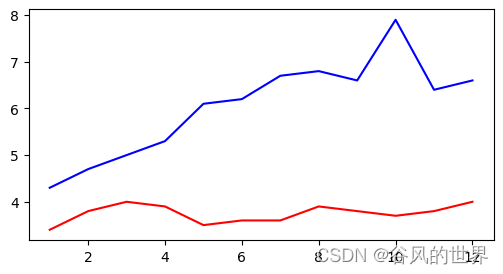
fig = plt.figure(figsize=(10,6))
colors = ['red', 'blue', 'green', 'orange', 'black']
for i in range(5):start_index = i*12end_index = (i+1)*12subset = unrate[start_index:end_index]plt.plot(subset['MONTH'], subset['VALUE'], c=colors[i])plt.show()
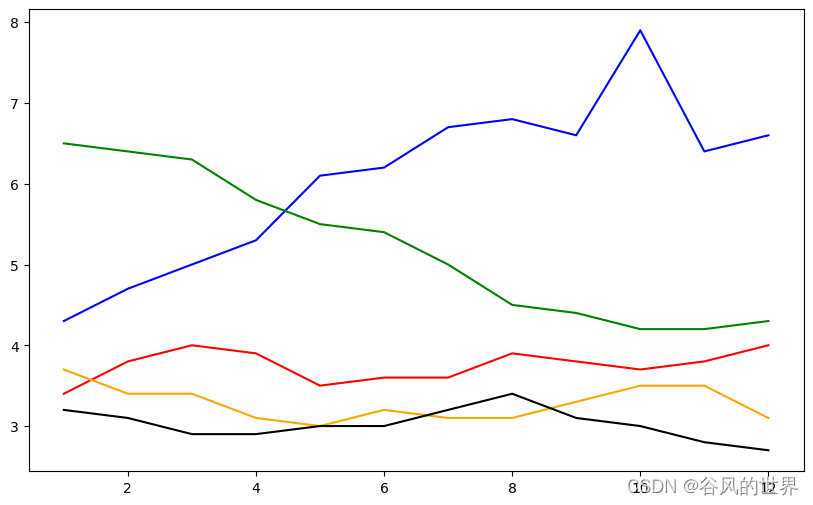
fig = plt.figure(figsize=(10,6))
colors = ['red', 'blue', 'green', 'orange', 'black']
#print(help(range))
for i in range(5):start_index = i*12end_index = (i+1)*12subset = unrate[start_index:end_index]label = str(1948 + i)plt.plot(subset['MONTH'], subset['VALUE'], c=colors[i], label=label)
plt.legend(loc='best')
# print (help(plt.legend))
plt.show()
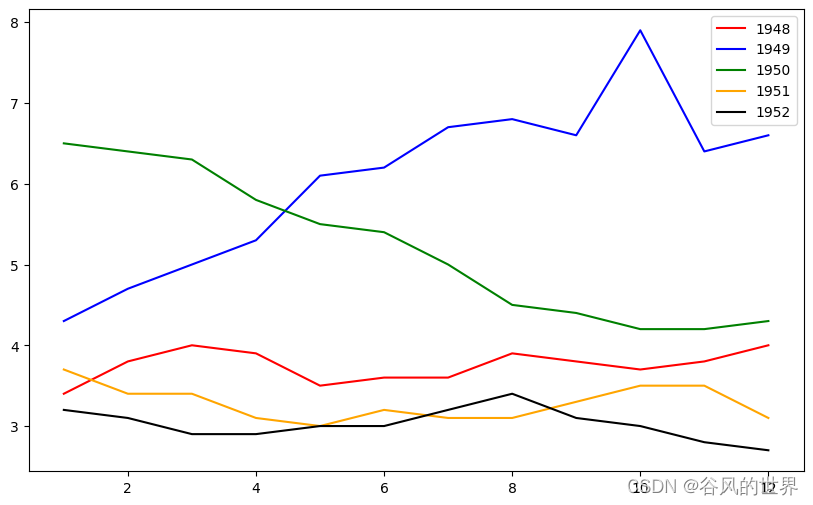
fig = plt.figure(figsize=(10,6))
colors = ['red', 'blue', 'green', 'orange', 'black']
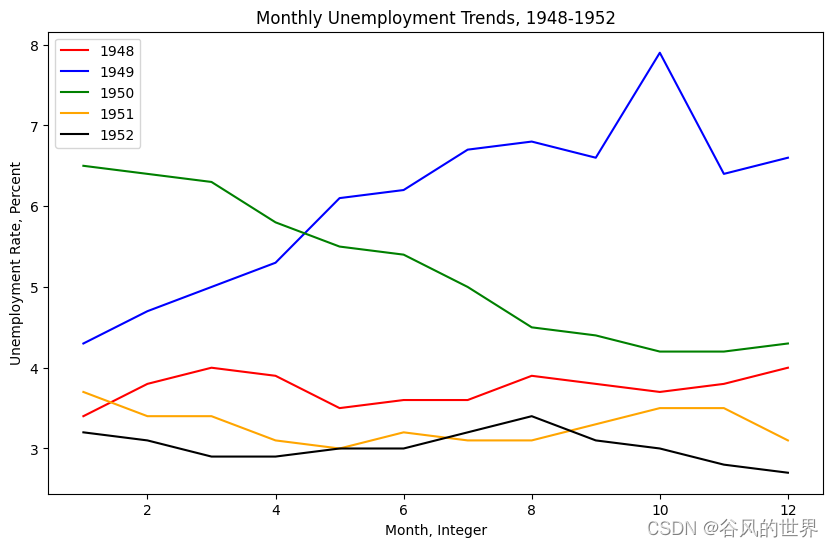
for i in range(5):start_index = i*12end_index = (i+1)*12subset = unrate[start_index:end_index]label = str(1948 + i)plt.plot(subset['MONTH'], subset['VALUE'], c=colors[i], label=label)
plt.legend(loc='upper left')
plt.xlabel('Month, Integer')
plt.ylabel('Unemployment Rate, Percent')
plt.title('Monthly Unemployment Trends, 1948-1952')
plt.show()
import matplotlib.pyplot as plt
from PIL import Image
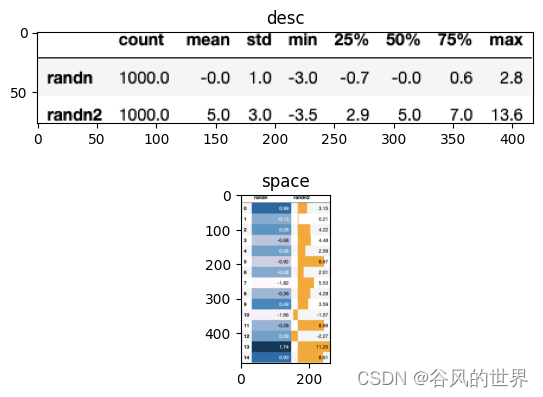
plt.figure()image1 = Image.open('./desc.png')
image2 = Image.open('./dfs.png')plt.subplot(2, 1, 1)
plt.imshow(image1)
plt.title("desc")
plt.subplot(2, 1, 2)
plt.imshow(image2)
plt.title("space")
plt.show()
二、柱状图
import pandas as pd
import matplotlib.pyplot as plt
reviews = pd.read_csv('../../data/fandango_scores.csv')
cols = ['FILM', 'RT_user_norm', 'Metacritic_user_nom', 'IMDB_norm', 'Fandango_Ratingvalue']
norm_reviews = reviews[cols]
print(norm_reviews[:5])
                             FILM  RT_user_norm  Metacritic_user_nom  \
0  Avengers: Age of Ultron (2015)           4.3                 3.55
1               Cinderella (2015)           4.0                 3.75
2                  Ant-Man (2015)           4.5                 4.05
3          Do You Believe? (2015)           4.2                 2.35
4   Hot Tub Time Machine 2 (2015)           1.4                 1.70   IMDB_norm  Fandango_Ratingvalue
0       3.90                   4.5
1       3.55                   4.5
2       3.90                   4.5
3       2.70                   4.5
4       2.55                   3.0
fandango_distribution = norm_reviews['Fandango_Ratingvalue'].value_counts()
fandango_distribution = fandango_distribution.sort_index()imdb_distribution = norm_reviews['IMDB_norm'].value_counts()
imdb_distribution = imdb_distribution.sort_index()print(fandango_distribution)
print(imdb_distribution)
2.7     2
2.8     2
2.9     5
3.0     4
3.1     3
3.2     5
3.3     4
3.4     9
3.5     9
3.6     8
3.7     9
3.8     5
3.9    12
4.0     7
4.1    16
4.2    12
4.3    11
4.4     7
4.5     9
4.6     4
4.8     3
Name: Fandango_Ratingvalue, dtype: int64
2.00     1
2.10     1
2.15     1
2.20     1
2.30     2
2.45     2
2.50     1
2.55     1
2.60     2
2.70     4
2.75     5
2.80     2
2.85     1
2.90     1
2.95     3
3.00     2
3.05     4
3.10     1
3.15     9
3.20     6
3.25     4
3.30     9
3.35     7
3.40     1
3.45     7
3.50     4
3.55     7
3.60    10
3.65     5
3.70     8
3.75     6
3.80     3
3.85     4
3.90     9
3.95     2
4.00     1
4.05     1
4.10     4
4.15     1
4.20     2
4.30     1
Name: IMDB_norm, dtype: int64
fig, ax = plt.subplots()
#ax.hist(norm_reviews['Fandango_Ratingvalue'])
#ax.hist(norm_reviews['Fandango_Ratingvalue'],bins=20)
ax.hist(norm_reviews['Fandango_Ratingvalue'], range=(4, 5),bins=20)
plt.show()
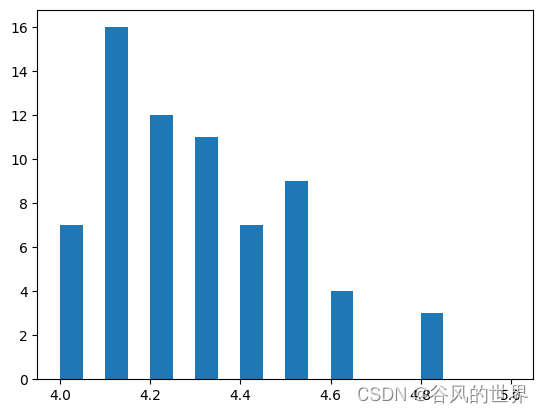
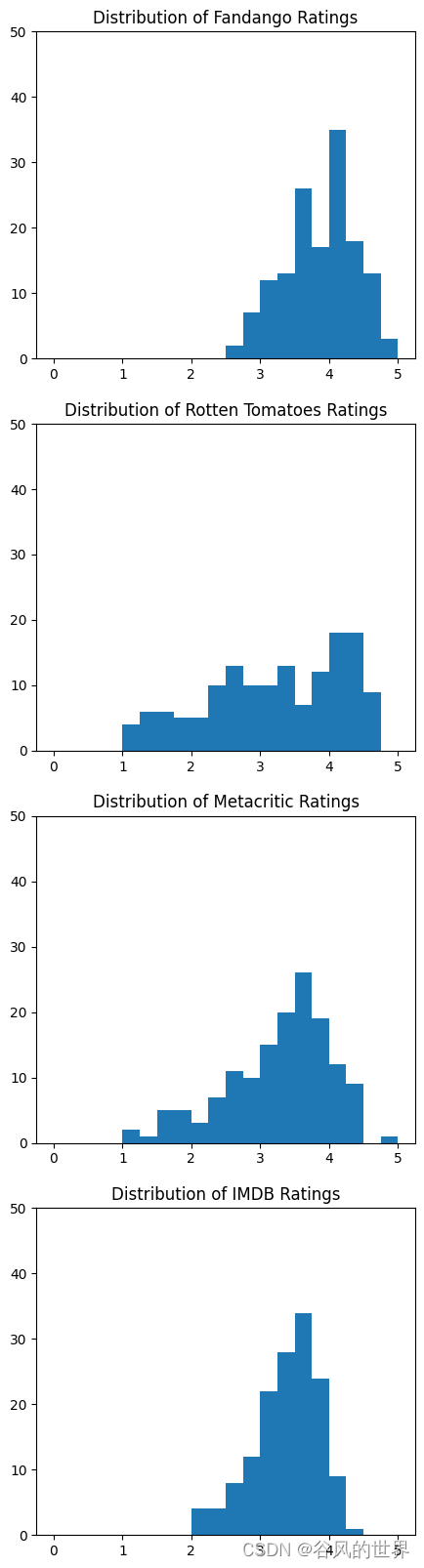
fig = plt.figure(figsize=(5,20))
ax1 = fig.add_subplot(4,1,1)
ax2 = fig.add_subplot(4,1,2)
ax3 = fig.add_subplot(4,1,3)
ax4 = fig.add_subplot(4,1,4)
ax1.hist(norm_reviews['Fandango_Ratingvalue'], bins=20, range=(0, 5))
ax1.set_title('Distribution of Fandango Ratings')
ax1.set_ylim(0, 50)ax2.hist(norm_reviews['RT_user_norm'], 20, range=(0, 5))
ax2.set_title('Distribution of Rotten Tomatoes Ratings')
ax2.set_ylim(0, 50)ax3.hist(norm_reviews['Metacritic_user_nom'], 20, range=(0, 5))
ax3.set_title('Distribution of Metacritic Ratings')
ax3.set_ylim(0, 50)ax4.hist(norm_reviews['IMDB_norm'], 20, range=(0, 5))
ax4.set_title('Distribution of IMDB Ratings')
ax4.set_ylim(0, 50)plt.show()
三、箱线图
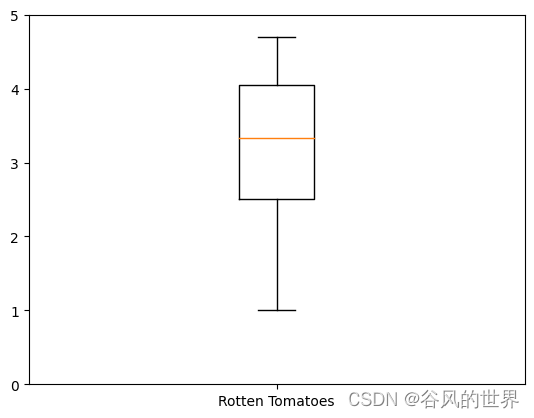
fig, ax = plt.subplots()
ax.boxplot(norm_reviews['RT_user_norm'])
ax.set_xticklabels(['Rotten Tomatoes'])
ax.set_ylim(0, 5)
plt.show()
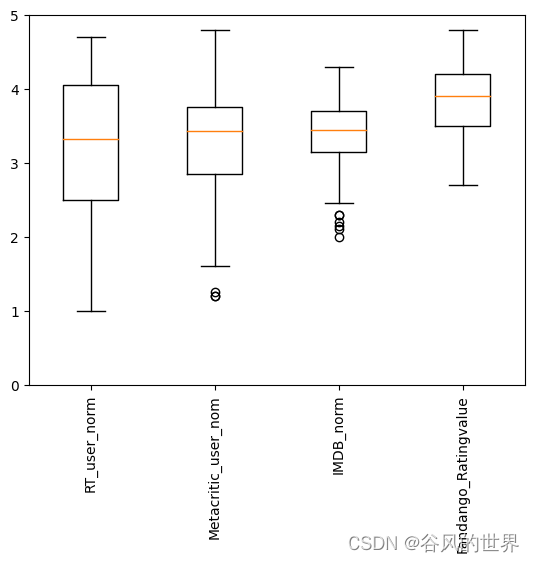
num_cols = ['RT_user_norm', 'Metacritic_user_nom', 'IMDB_norm', 'Fandango_Ratingvalue']
fig, ax = plt.subplots()
ax.boxplot(norm_reviews[num_cols].values)
ax.set_xticklabels(num_cols, rotation=90)
ax.set_ylim(0,5)
plt.show()
)


))


![[SWPUCTF 2021 新生赛]error](http://pic.xiahunao.cn/[SWPUCTF 2021 新生赛]error)


)
)
