Centos7+Nginx+Keepalived实现Apache服务的高可用&负载均衡
今天是2017年的第一天,昨天也就是2016年的最后一天,我尝试部署了Centos7+Nginx+Keepalived实现WEB服务的高可用负载均衡服务,终于在2017年的第一天前完成了,所以在此分享给有需要的朋友;说到负载均衡,其实在linux下有很多服务可以实现,比如nginx、haproxy、lvs等服务,当前我们在前面的文章有介绍过了,但是对于高可用服务,我们在linux下最常见也是应用最多的是Keepalived,对于这些综合服务对于一个管理员来说是必须要会的,所以今天我们主要介绍的是Centos7+Nginx+Keepalived实现WEB(Apache)服务的高可用负载均衡。具体见下:
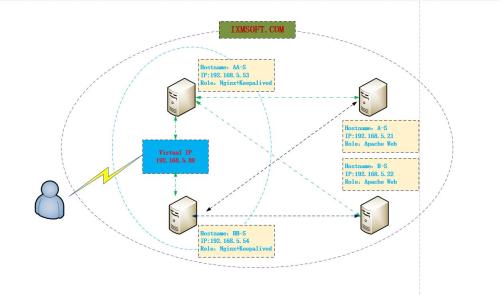
环境介绍:
Hostname:A-S
IP:192.168.5.21
Role:Apache Web Service
Hostname:B-S
IP:192.168.5.22
Role:Apache Web Service
Hostname:BB-S
IP:192.168.5.53
Role:Nginx+Keepalived
Hostname:BB-S
IP:192.168.5.54
Role:Nginx+Keepalived
Virtual IP:192.168.5.88
我们需要首先安装两台Apache Web服务
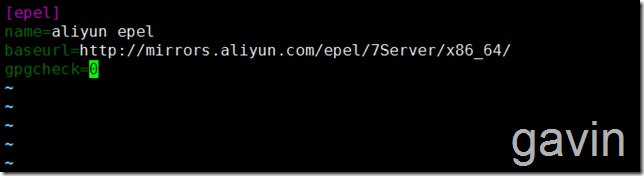
因为我们准备使用yum安装服务,所以需要定义阿里云仓库
cd /etc/yum.repo
vim epel.repo
添加以下内容
[epel]   name=aliyun epel    baseurl=http://mirrors.aliyun.com/epel/7Server/x86_64/
gpgcheck=0

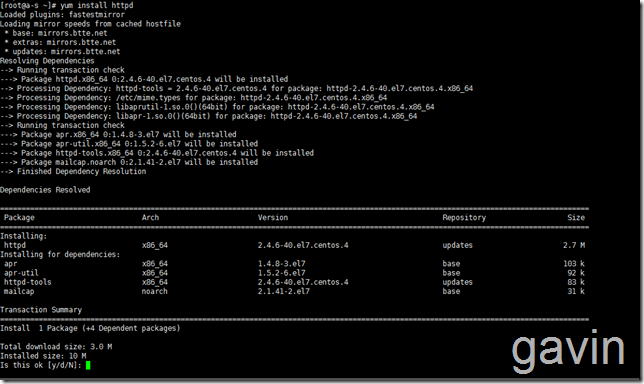
首先在192.168.5.21上安装apache
yum isntall -y httpd
然后定义显示页面
vim /var/www/html/index.html
</html>
<!DOCTYPE html>
<html>
<head>
<title>Welcome to Apache</title>
<style>body {35em;margin: 0 auto;font-family: Tahoma, Verdana, Arial, sans-serif;}
</style>
<style type="text/css">
h1{color:red}
h2{color:blue}
h3{color:green}
h4{color:yellow}
}
</style>
</head><body bgcolor='#46A3FF'>
<h1>Welcome to A-S Apache</h1>
<h2>HostName:A-S</h2>
<h3>IP:192.168.5.21</h3>
<h4>Service:Apache</h4>
<input type=button  value="Refresh" οnclick="window.location.href('http://192.168.5.21')">
</body>
</html>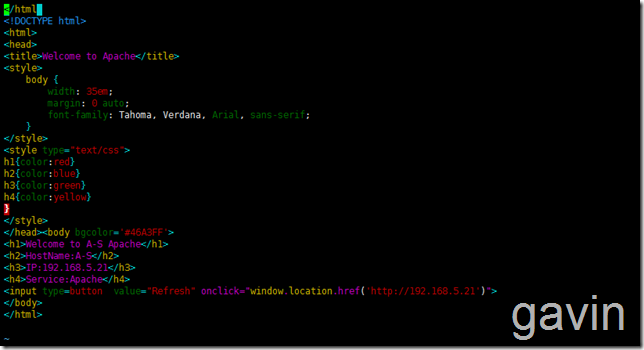
Systemctl start httpd
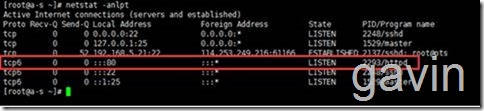
然后添加默认的防火墙端口8o
Firewall-cmd --zone=public --add-port='80/tcp' --permanent

或者vim /etc/firewalld/zone/public.xml
添加一下格式
<port portocal='tcp' port='80'>
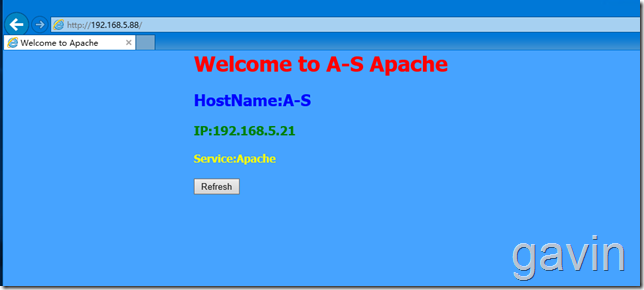
我们测试访问
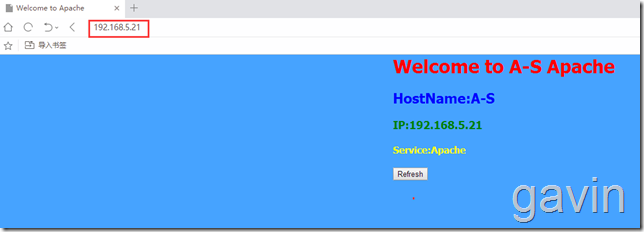
我们按照同上的方法在第二台服务器上进行配置,安装跳过
第二台主机的配置:192.168.5.22 主机名 B-S
安装好httpd后,我们将a-s上的index拷贝到b-s服务器上
scp index.html root@192.168.5.22:/var/www/html/
然后修改index.html文件
</html>
<!DOCTYPE html>
<html>
<head>
<title>Welcome to Apache</title>
<style>body {35em;margin: 0 auto;font-family: Tahoma, Verdana, Arial, sans-serif;}
</style>
<style type="text/css">
h1{color:red}
h2{color:blue}
h3{color:green}
h4{color:yellow}
}
</style>
</head><body bgcolor='#CA8EFF'>
<h1>Welcome to B-S Apache</h1>
<h2>HostName:B-S</h2>
<h3>IP:192.168.5.22</h3>
<h4>Service:Apache</h4>
<input type=button  value="Refresh" οnclick="window.location.href('http://192.168.5.22')">
</body>
</html>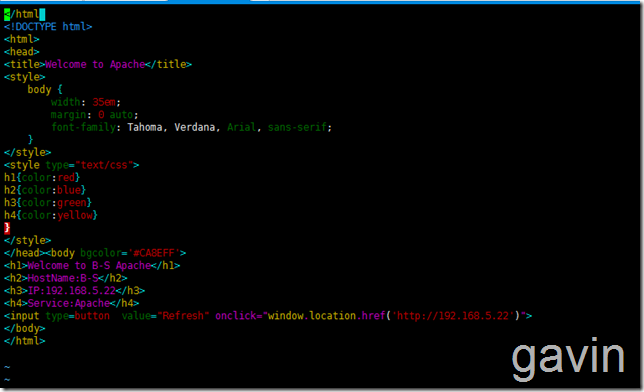
测试访问
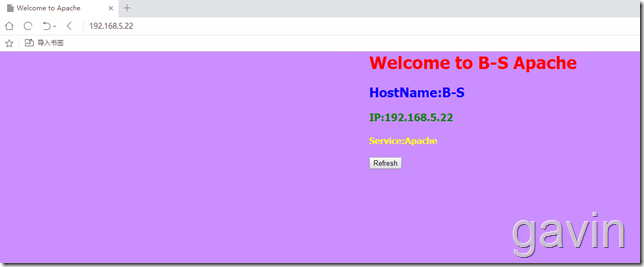
接下来我们开始准备在两台前端服务器192.168.5.53、192.168.5.54上安装nginx和keepalived;我们将keepalived和nginx安装在同一台机器上
我们首先在主备服务器上安装nginx
我们首先要定于安装源, 才可以使用yum安装,我们在主备服务器上都配置
cd /etc/yum.repo
vim epel.repo
添加以下内容
[epel]   name=aliyun epel    baseurl=http://mirrors.aliyun.com/epel/7Server/x86_64/
gpgcheck=0
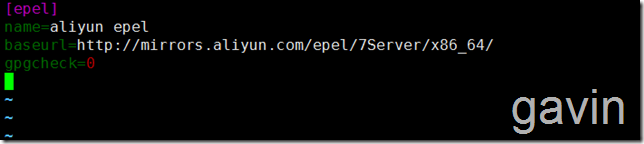
定义好后,我们将定义的安装源给另外一台备服务器也拷贝一份
scp /etc/yum.repo/epel.repo root@192.168.5.54/etc/yum.repo/

指定源后,我们就可以开始安装nginx了,首先在主服务器上
yum install -y nginx
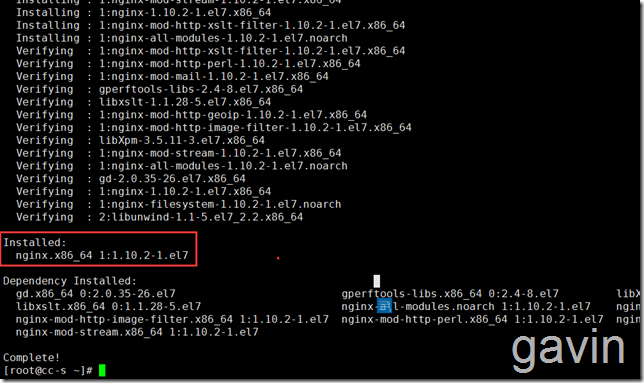
安装后,我们首先查看默认的nginx配置
vim /etc/nginx/nginx.conf
# For more information on configuration, see:
#   * Official English Documentation: http://nginx.org/en/docs/
#   * Official Russian Documentation: http://nginx.org/ru/docs/
user nginx;
worker_processes auto;
error_log /var/log/nginx/error.log;
pid /run/nginx.pid;
# Load dynamic modules. See /usr/share/nginx/README.dynamic.
include /usr/share/nginx/modules/*.conf;
events {worker_connections 1024;
}
http {log_format  main  '$remote_addr - $remote_user [$time_local] "$request" ''$status $body_bytes_sent "$http_referer" ''"$http_user_agent" "$http_x_forwarded_for"';access_log  /var/log/nginx/access.log  main;sendfile            on;tcp_nopush          on;tcp_nodelay         on;keepalive_timeout   65;types_hash_max_size 2048;include             /etc/nginx/mime.types;default_type        application/octet-stream;# Load modular configuration files from the /etc/nginx/conf.d directory.# See http://nginx.org/en/docs/ngx_core_module.html#include# for more information.include /etc/nginx/conf.d/*.conf;server {listen       80 default_server;listen       [::]:80 default_server;server_name  _;root         /usr/share/nginx/html;# Load configuration files for the default server block.include /etc/nginx/default.d/*.conf;location / {}error_page 404 /404.html;location = /40x.html {}error_page 500 502 503 504 /50x.html;location = /50x.html {}}
# Settings for a TLS enabled server.
#
#    server {
#        listen       443 ssl http2 default_server;
#        listen       [::]:443 ssl http2 default_server;
#        server_name  _;
#        root         /usr/share/nginx/html;
#
#        ssl_certificate "/etc/pki/nginx/server.crt";
#        ssl_certificate_key "/etc/pki/nginx/private/server.key";
#        ssl_session_cache shared:SSL:1m;
#        ssl_session_timeout  10m;
#        ssl_ciphers HIGH:!aNULL:!MD5;
#        ssl_prefer_server_ciphers on;
#
#        # Load configuration files for the default server block.
#        include /etc/nginx/default.d/*.conf;
#
#        location / {
#        }
#
#        error_page 404 /404.html;
#            location = /40x.html {
#        }
#
#        error_page 500 502 503 504 /50x.html;
#            location = /50x.html {
#        }
#    }
}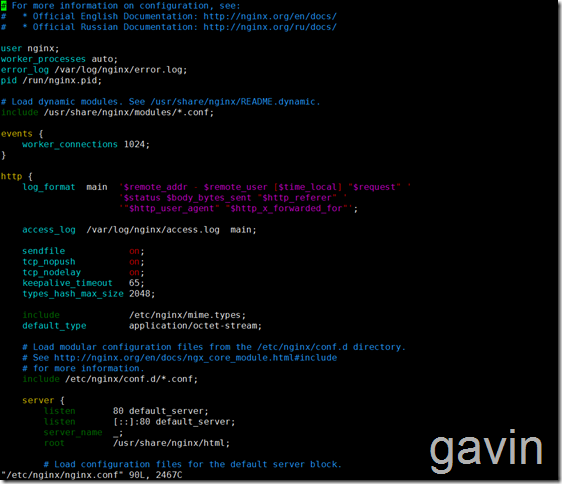
默认配置我们备份一份
cp /etc/nginx/nginx.conf /etc/nginx/nginx.conf.bak

接下来我们要配置nginx实现后端服务器的web的负载均衡;
在此我们使用的是nginx负载均衡的默认方式-轮询
我们需要在http区域里面添加负载配置
upstream real_server_pool {#ip_hash;server 192.168.5.21:80 weight=1 max_fails=2 fail_timeout=30s;server 192.168.5.22:80 weight=1 max_fails=2 fail_timeout=30s;}# 添加一组真实的服务器地址池# 供proxy_pass和fastcgi_pass指令中使用的代理服务器# 后台如果有动态应用的时候,ip_hash指令可以通过hash算法# 将客户端请求定位到同一台后端服务器上,解决session共享,# 但建议用动态应用做session共享# server用于指定一个后端服务器的名称和参数# weight代表权,重默认为1,权重越高被分配的客户端越多# max_fails 指定时间内对后端请求失败的次数# fail_timeout 达到max_fails指定的失败次数后暂停的时间# down参数用来标记为离线,不参与负载均衡.在ip_hash下使用# backup仅仅在非backup服务器宕机或繁忙的时候使用server {listen 192.168.5.53:80; # 监听ip改为本地ipserver_name localhost;#charset koi8-r;#access_log logs/host.access.log main;location / {#root html;#index index.html index.htm;proxy_next_upstream http_502 http_504 error timeout invalid_header;proxy_pass http://real_server_pool;proxy_set_header Host $host;proxy_set_header X-Forwarded-For $remote_addr;}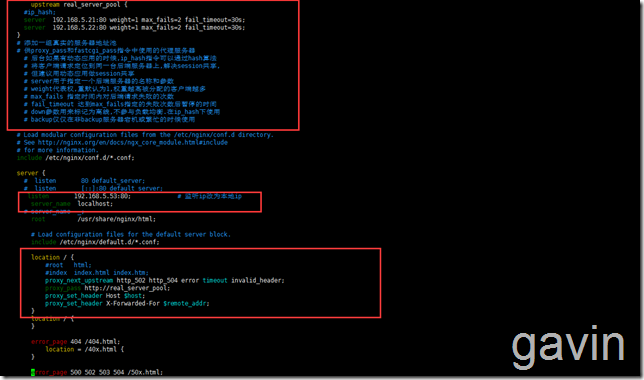
添加后的
# For more information on configuration, see:
#   * Official English Documentation: http://nginx.org/en/docs/
#   * Official Russian Documentation: http://nginx.org/ru/docs/
user nginx;
worker_processes auto;
error_log /var/log/nginx/error.log;
pid /run/nginx.pid;
# Load dynamic modules. See /usr/share/nginx/README.dynamic.
include /usr/share/nginx/modules/*.conf;
events {worker_connections 1024;
}
http {log_format  main  '$remote_addr - $remote_user [$time_local] "$request" ''$status $body_bytes_sent "$http_referer" ''"$http_user_agent" "$http_x_forwarded_for"';access_log  /var/log/nginx/access.log  main;sendfile            on;tcp_nopush          on;tcp_nodelay         on;keepalive_timeout   65;types_hash_max_size 2048;include             /etc/nginx/mime.types;default_type        application/octet-stream;upstream real_server_pool {#ip_hash;server  192.168.5.21:80 weight=1 max_fails=2 fail_timeout=30s;server  192.168.5.22:80 weight=1 max_fails=2 fail_timeout=30s;}# 添加一组真实的服务器地址池# 供proxy_pass和fastcgi_pass指令中使用的代理服务器# 后台如果有动态应用的时候,ip_hash指令可以通过hash算法# 将客户端请求定位到同一台后端服务器上,解决session共享,# 但建议用动态应用做session共享# server用于指定一个后端服务器的名称和参数# weight代表权,重默认为1,权重越高被分配的客户端越多# max_fails 指定时间内对后端请求失败的次数# fail_timeout 达到max_fails指定的失败次数后暂停的时间# down参数用来标记为离线,不参与负载均衡.在ip_hash下使用# backup仅仅在非backup服务器宕机或繁忙的时候使用# Load modular configuration files from the /etc/nginx/conf.d directory.# See http://nginx.org/en/docs/ngx_core_module.html#include# for more information.include /etc/nginx/conf.d/*.conf;server {#  listen       80 default_server;#  listen       [::]:80 default_server;listen       192.168.5.53:80;             # 监听ip改为本地ipserver_name  localhost;# server_name  _;root         /usr/share/nginx/html;# Load configuration files for the default server block.include /etc/nginx/default.d/*.conf;
#增加的location / {#root   html;#index  index.html index.htm;proxy_next_upstream http_502 http_504 error timeout invalid_header;proxy_pass http://real_server_pool;proxy_set_header Host $host;proxy_set_header X-Forwarded-For $remote_addr;}error_page 404 /404.html;location = /40x.html {}error_page 500 502 503 504 /50x.html;location = /50x.html {}}
# Settings for a TLS enabled server.
#
#    server {
#        listen       443 ssl http2 default_server;
#        listen       [::]:443 ssl http2 default_server;
#        server_name  _;
#        root         /usr/share/nginx/html;
#
#        ssl_certificate "/etc/pki/nginx/server.crt";
#        ssl_certificate_key "/etc/pki/nginx/private/server.key";
#        ssl_session_cache shared:SSL:1m;
#        ssl_session_timeout  10m;
#        ssl_ciphers HIGH:!aNULL:!MD5;
#        ssl_prefer_server_ciphers on;
#
#        # Load configuration files for the default server block.
#        include /etc/nginx/default.d/*.conf;
#
#        location / {
#        }
#
#        error_page 404 /404.html;
#            location = /40x.html {
#        }
#
#        error_page 500 502 503 504 /50x.html;
#            location = /50x.html {
#        }
#    }
}
接着我们重启nginx
systemctl enable nginx
systemctl start nginx

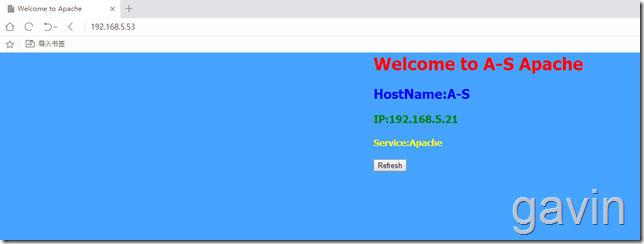
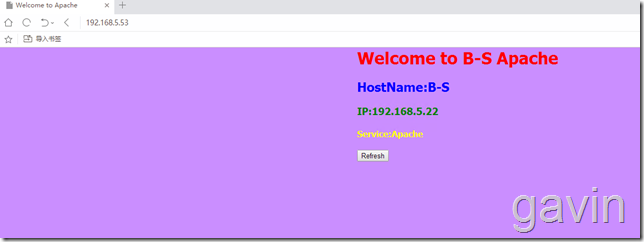
接下来我们尝试访问一下,因为使用的是轮询,所以访问nginx会跳转到不同的两个页面
我们在安装keepalived前,先配置路由转发
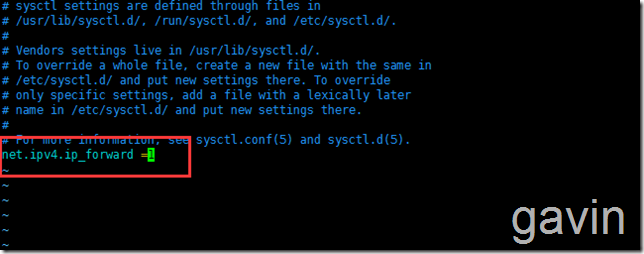
vim /etc/sysctl.conf
net.ipv4.ip_forward = 1 # 此参数改为1
sysctl -p # 使修改生效

接着我们在主服务器上安装keepalived
yum install -y keepalived
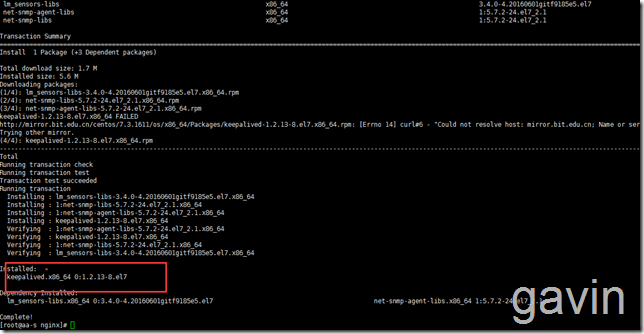
安装完成后,我们备份一下keepalived的配置文件
cp /etc/keepalived/keepalived.conf /etc/keepalived/keepalived.conf.bak

接下来我们查看一下默认的keepalived默认配置
cat /etc/keepalived/keepalived.conf
! Configuration File for keepalived
global_defs {notification_email {acassen@firewall.locfailover@firewall.locsysadmin@firewall.loc}notification_email_from Alexandre.Cassen@firewall.locsmtp_server 192.168.200.1smtp_connect_timeout 30router_id LVS_DEVEL
}
vrrp_instance VI_1 {state MASTERinterface eth0virtual_router_id 51priority 100advert_int 1authentication {auth_type PASSauth_pass 1111}virtual_ipaddress {192.168.200.16192.168.200.17192.168.200.18}
}
virtual_server 192.168.200.100 443 {delay_loop 6lb_algo rrlb_kind NATnat_mask 255.255.255.0persistence_timeout 50protocol TCPreal_server 192.168.201.100 443 {weight 1SSL_GET {url {path /digest ff20ad2481f97b1754ef3e12ecd3a9cc}url {path /mrtg/digest 9b3a0c85a887a256d6939da88aabd8cd}connect_timeout 3nb_get_retry 3delay_before_retry 3}}
}
virtual_server 10.10.10.2 1358 {delay_loop 6lb_algo rrlb_kind NATpersistence_timeout 50protocol TCPsorry_server 192.168.200.200 1358real_server 192.168.200.2 1358 {weight 1HTTP_GET {url {path /testurl/test.jspdigest 640205b7b0fc66c1ea91c463fac6334d}url {path /testurl2/test.jspdigest 640205b7b0fc66c1ea91c463fac6334d}url {path /testurl3/test.jspdigest 640205b7b0fc66c1ea91c463fac6334d}connect_timeout 3nb_get_retry 3delay_before_retry 3}}real_server 192.168.200.3 1358 {weight 1HTTP_GET {url {path /testurl/test.jspdigest 640205b7b0fc66c1ea91c463fac6334c}url {path /testurl2/test.jspdigest 640205b7b0fc66c1ea91c463fac6334c}connect_timeout 3nb_get_retry 3delay_before_retry 3}}
}
virtual_server 10.10.10.3 1358 {delay_loop 3lb_algo rrlb_kind NATnat_mask 255.255.255.0persistence_timeout 50protocol TCPreal_server 192.168.200.4 1358 {weight 1HTTP_GET {url {path /testurl/test.jspdigest 640205b7b0fc66c1ea91c463fac6334d}url {path /testurl2/test.jspdigest 640205b7b0fc66c1ea91c463fac6334d}url {path /testurl3/test.jspdigest 640205b7b0fc66c1ea91c463fac6334d}connect_timeout 3nb_get_retry 3delay_before_retry 3}}real_server 192.168.200.5 1358 {weight 1HTTP_GET {url {path /testurl/test.jspdigest 640205b7b0fc66c1ea91c463fac6334d}url {path /testurl2/test.jspdigest 640205b7b0fc66c1ea91c463fac6334d}url {path /testurl3/test.jspdigest 640205b7b0fc66c1ea91c463fac6334d}connect_timeout 3nb_get_retry 3delay_before_retry 3}}
}
接下来我们修改默认的keepalived配置
echo > /etc/keepalived/keepalived.conf

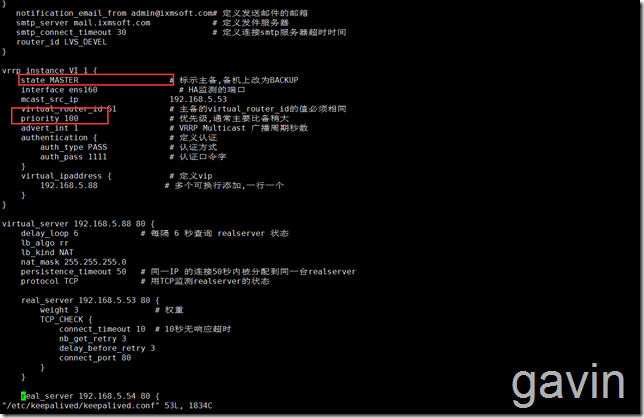
我们清空默认配置后,添加以下内容
vim /etc/keepalived/keepalived.conf
global_defs {notification_email {gavin@ixmsoft.com             # 定义通知邮箱,有多个可以换行添加
}notification_email_from admin@ixmsoft.com# 定义发送邮件的邮箱smtp_server mail.ixmsoft.com             # 定义发件服务器smtp_connect_timeout 30                  # 定义连接smtp服务器超时时间router_id LVS_DEVEL
}
vrrp_instance VI_1 {state MASTER                   # 标示主备,备机上改为BACKUPinterface   ens160           # HA监测的端口virtual_router_id 51           # 主备的virtual_router_id的值必须相同priority 100                   # 优先级,通常主要比备稍大advert_int 1                   # VRRP Multicast 广播周期秒数authentication {               # 定义认证auth_type PASS             # 认证方式auth_pass 1111             # 认证口令字}virtual_ipaddress {            # 定义vip192.168.5.88              # 多个可换行添加,一行一个}
}
virtual_server 192.168.5.88 80 {delay_loop 6             # 每隔 6 秒查询 realserver 状态lb_algo rrlb_kind NATnat_mask 255.255.255.0persistence_timeout 50   # 同一IP 的连接50秒内被分配到同一台realserverprotocol TCP             # 用TCP监测realserver的状态real_server 192.168.5.53 80 {             #需要指向nginx负载的地址weight 3                # 权重TCP_CHECK {connect_timeout 10  # 10秒无响应超时nb_get_retry 3delay_before_retry 3connect_port 80}}real_server 192.168.5.54 80 {              #需要指向nginx负载的地址weight 3TCP_CHECK {connect_timeout 3delay_before_retry 3connect_port 80}}
}
我们介绍一下主要参数
global_defs
notification_email : keepalived在发生诸如切换操作时需要发送email通知地址,后面的 smtp_server 相比也都知道是邮件服务器地址。也可以通过其它方式报警,毕竟邮件不是实时通知的。
router_id : 机器标识,通常可设为hostname。故障发生时,邮件通知会用到
vrrp_instance
state : 指定instance(Initial)的初始状态,就是说在配置好后,这台服务器的初始状态就是这里指定的,但这里指定的不算,还是得要通过竞选通过优先级来确定。如果这里设置为MASTER,但如若他的优先级不及另外一台,那么这台在发送通告时,会发送自己的优先级,另外一台发现优先级不如自己的高,那么他会就回抢占为MASTER
interface : 实例绑定的网卡,因为在配置虚拟IP的时候必须是在已有的网卡上添加的
mcast_src_ip : 发送多播数据包时的源IP地址,这里注意了,这里实际上就是在那个地址上发送VRRP通告,这个非常重要,一定要选择稳定的网卡端口来发送,这里相当于heartbeat的心跳端口,如果没有设置那么就用默认的绑定的网卡的IP,也就是interface指定的IP地址
virtual_router_id : 这里设置VRID,这里非常重要,相同的VRID为一个组,他将决定多播的MAC地址
priority : 设置本节点的优先级,优先级高的为master
advert_int : 检查间隔,默认为1秒。这就是VRRP的定时器,MASTER每隔这样一个时间间隔,就会发送一个advertisement报文以通知组内其他路由器自己工作正常
authentication : 定义认证方式和密码,主从必须一样
virtual_ipaddress : 这里设置的就是VIP,也就是虚拟IP地址,他随着state的变化而增加删除,当state为master的时候就添加,当state为backup的时候删除,这里主要是有优先级来决定的,和state设置的值没有多大关系,这里可以设置多个IP地址
track_script : 引用VRRP脚本,即在 vrrp_script 部分指定的名字。定期运行它们来改变优先级,并最终引发主备切换。
vrrp_script
告诉 keepalived 在什么情况下切换,所以尤为重要。可以有多个 vrrp_script
script : 自己写的检测脚本。也可以是一行命令如killall -0 nginx
interval 2 : 每2s检测一次
weight -5 : 检测失败(脚本返回非0)则优先级 -5
fall 2 : 检测连续 2 次失败才算确定是真失败。会用weight减少优先级(1-255之间)
rise 1 : 检测 1 次成功就算成功。但不修改优先级
保存退出后,我们启动keepalived
systemctl start keepalived
systemctl enable keepalived

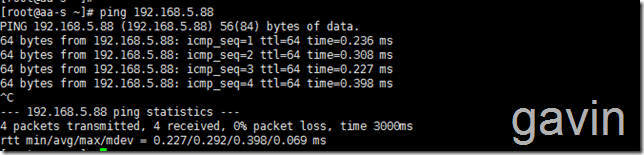
然后我们测试ping一下vistual ip
注:如果ping不通vistual ip的话,有可能是keepalived.conf文件的中的网卡配置,centos6的网卡是eth0,而centos7的是 ens160
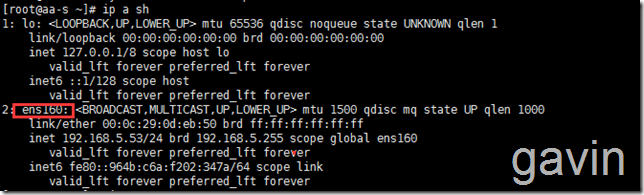
ping 192.168.5.88
接下来我们配置第二台备服务器,然后首先安装及配置nginx
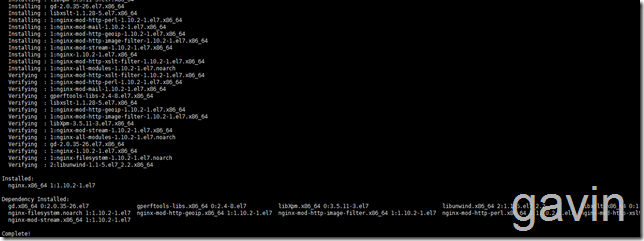
yum install -y nginx
然后备份备服务器的nginx.conf文件
cp /etc/nginx/nginx.conf /etc/nginx/nginx.conf.bak

然后我们从主服务器下的nginx.conf配置拷贝到备服务器nginx目录下,然后替换默认的nginx.conf文件
scp /etc/nginx/nginx.conf root@192.168.5.54:/etc/nginx/

然后我们修改备服务器的监听地址,需要指向备服务器的本地地址---> listen 192.168.5.54:80; # 监听ip改为本地ip
# For more information on configuration, see:
#   * Official English Documentation: http://nginx.org/en/docs/
# For more information on configuration, see:
#   * Official English Documentation: http://nginx.org/en/docs/
#   * Official Russian Documentation: http://nginx.org/ru/docs/
user nginx;
worker_processes auto;
error_log /var/log/nginx/error.log;
pid /run/nginx.pid;
# Load dynamic modules. See /usr/share/nginx/README.dynamic.
include /usr/share/nginx/modules/*.conf;
events {worker_connections 1024;
}
http {log_format  main  '$remote_addr - $remote_user [$time_local] "$request" ''$status $body_bytes_sent "$http_referer" ''"$http_user_agent" "$http_x_forwarded_for"';access_log  /var/log/nginx/access.log  main;sendfile            on;tcp_nopush          on;tcp_nodelay         on;keepalive_timeout   65;types_hash_max_size 2048;include             /etc/nginx/mime.types;default_type        application/octet-stream;upstream real_server_pool {#ip_hash;server  192.168.5.21:80 weight=1 max_fails=2 fail_timeout=30s;server  192.168.5.22:80 weight=1 max_fails=2 fail_timeout=30s;}# 添加一组真实的服务器地址池# 供proxy_pass和fastcgi_pass指令中使用的代理服务器# 后台如果有动态应用的时候,ip_hash指令可以通过hash算法# 将客户端请求定位到同一台后端服务器上,解决session共享,# 但建议用动态应用做session共享# server用于指定一个后端服务器的名称和参数# weight代表权,重默认为1,权重越高被分配的客户端越多# max_fails 指定时间内对后端请求失败的次数# fail_timeout 达到max_fails指定的失败次数后暂停的时间# down参数用来标记为离线,不参与负载均衡.在ip_hash下使用# backup仅仅在非backup服务器宕机或繁忙的时候使用# Load modular configuration files from the /etc/nginx/conf.d directory.# See http://nginx.org/en/docs/ngx_core_module.html#include# for more information.include /etc/nginx/conf.d/*.conf;server {#  listen       80 default_server;#  listen       [::]:80 default_server;listen       192.168.5.54:80;             # 监听ip改为本地ipserver_name  localhost;# server_name  _;root         /usr/share/nginx/html;# Load configuration files for the default server block.include /etc/nginx/default.d/*.conf;location / {#root   html;#index  index.html index.htm;proxy_next_upstream http_502 http_504 error timeout invalid_header;proxy_pass http://real_server_pool;proxy_set_header Host $host;proxy_set_header X-Forwarded-For $remote_addr;}error_page 404 /404.html;location = /40x.html {}error_page 500 502 503 504 /50x.html;location = /50x.html {}}
# Settings for a TLS enabled server.
#
#    server {
#        listen       443 ssl http2 default_server;
#        listen       [::]:443 ssl http2 default_server;
#        server_name  _;
#        root         /usr/share/nginx/html;
#
#        ssl_certificate "/etc/pki/nginx/server.crt";
#        ssl_certificate_key "/etc/pki/nginx/private/server.key";
#        ssl_session_cache shared:SSL:1m;
#        ssl_session_timeout  10m;
#        ssl_ciphers HIGH:!aNULL:!MD5;
#        ssl_prefer_server_ciphers on;
#
#        # Load configuration files for the default server block.
#        include /etc/nginx/default.d/*.conf;
#
#        location / {
#        }
#
#        error_page 404 /404.html;
#            location = /40x.html {
#        }
#
#        error_page 500 502 503 504 /50x.html;
#            location = /50x.html {
#        }
#    }
}
其实我们也可以只修改添加的内容
upstream real_server_pool {#ip_hash;server 192.168.5.21:80 weight=1 max_fails=2 fail_timeout=30s;server 192.168.5.22:80 weight=1 max_fails=2 fail_timeout=30s;}# 添加一组真实的服务器地址池# 供proxy_pass和fastcgi_pass指令中使用的代理服务器# 后台如果有动态应用的时候,ip_hash指令可以通过hash算法# 将客户端请求定位到同一台后端服务器上,解决session共享,# 但建议用动态应用做session共享# server用于指定一个后端服务器的名称和参数# weight代表权,重默认为1,权重越高被分配的客户端越多# max_fails 指定时间内对后端请求失败的次数# fail_timeout 达到max_fails指定的失败次数后暂停的时间# down参数用来标记为离线,不参与负载均衡.在ip_hash下使用# backup仅仅在非backup服务器宕机或繁忙的时候使用server {listen 192.168.5.54:80; # 监听ip改为本地ipserver_name localhost;#charset koi8-r;#access_log logs/host.access.log main;location / {#root html;#index index.html index.htm;proxy_next_upstream http_502 http_504 error timeout invalid_header;proxy_pass http://real_server_pool;proxy_set_header Host $host;proxy_set_header X-Forwarded-For $remote_addr;}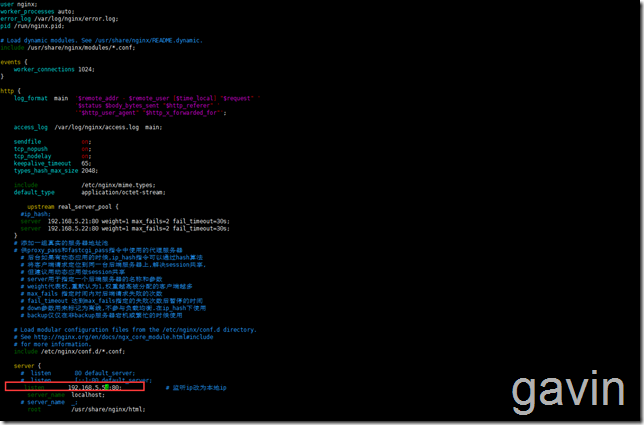
然后我们启动备服务器的nginx服务
systemctl start nginx
systemctl enable nginx

我们在安装keepalived前,先配置路由转发
vim /etc/sysctl.conf
net.ipv4.ip_forward = 1 # 此参数改为1
![Image(26)[1]](https://s3.51cto.com/wyfs02/M02/8C/48/wKiom1hn5RTjxE9cAAD-wH5wdpA955.png "Image(26)[1]")
sysctl -p # 使修改生效

然后安装keepalived
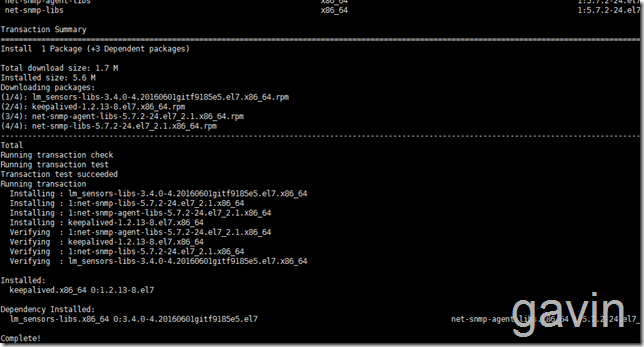
然后我们备份默认keepalived配置
cp /etc/keepalived/keepalived.conf /etc/keepalived/keepalived.conf.bak

然后修改拷贝的数据文件,
scp /etc/keepalived/keepalived.conf root@192.168.5.54:/etc/keepalived/

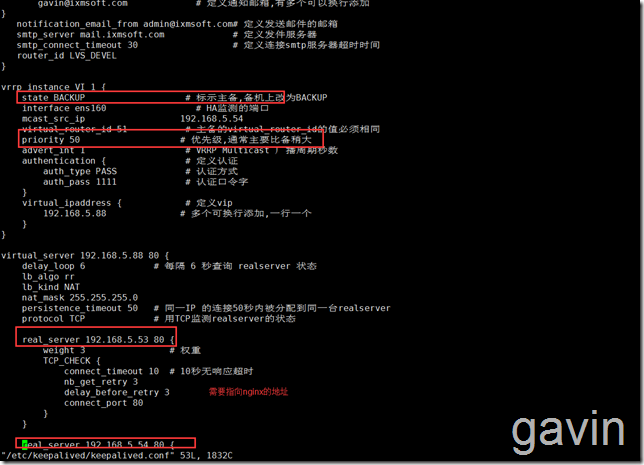
配置备用调度器的keepalived,只需要将state MASTER 改为state BACKUP,降低priority 100 的值:
vim /etc/keepalived/keepalived.conf
global_defs {notification_email {gavin@ixmsoft.com             # 定义通知邮箱,有多个可以换行添加
}notification_email_from admin@ixmsoft.com# 定义发送邮件的邮箱smtp_server mail.ixmsoft.com             # 定义发件服务器smtp_connect_timeout 30                  # 定义连接smtp服务器超时时间router_id LVS_DEVEL
}
vrrp_instance VI_1 {state BACKUP                   # 标示主备,备机上改为BACKUPinterface    ens160          # HA监测的端口virtual_router_id 51           # 主备的virtual_router_id的值必须相同priority 50                   # 优先级,通常主要比备稍大advert_int 1                   # VRRP Multicast 广播周期秒数authentication {               # 定义认证auth_type PASS             # 认证方式auth_pass 1111             # 认证口令字}virtual_ipaddress {            # 定义vip192.168.5.88              # 多个可换行添加,一行一个}
}
virtual_server 192.168.5.88 80 {delay_loop 6             # 每隔 6 秒查询 realserver 状态lb_algo rrlb_kind NATnat_mask 255.255.255.0persistence_timeout 50   # 同一IP 的连接50秒内被分配到同一台realserverprotocol TCP             # 用TCP监测realserver的状态real_server 192.168.5.53 80 {       #需要指向nginx负载的地址weight 3                # 权重TCP_CHECK {connect_timeout 10  # 10秒无响应超时nb_get_retry 3delay_before_retry 3connect_port 80}}real_server 192.168.5.54 80 {   #需要指向nginx负载的地址weight 3TCP_CHECK {connect_timeout 3delay_before_retry 3connect_port 80}}
}
我们介绍一下主要参数
global_defs
notification_email : keepalived在发生诸如切换操作时需要发送email通知地址,后面的 smtp_server 相比也都知道是邮件服务器地址。也可以通过其它方式报警,毕竟邮件不是实时通知的。
router_id : 机器标识,通常可设为hostname。故障发生时,邮件通知会用到
vrrp_instance
state : 指定instance(Initial)的初始状态,就是说在配置好后,这台服务器的初始状态就是这里指定的,但这里指定的不算,还是得要通过竞选通过优先级来确定。如果这里设置为MASTER,但如若他的优先级不及另外一台,那么这台在发送通告时,会发送自己的优先级,另外一台发现优先级不如自己的高,那么他会就回抢占为MASTER
interface : 实例绑定的网卡,因为在配置虚拟IP的时候必须是在已有的网卡上添加的
mcast_src_ip : 发送多播数据包时的源IP地址,这里注意了,这里实际上就是在那个地址上发送VRRP通告,这个非常重要,一定要选择稳定的网卡端口来发送,这里相当于heartbeat的心跳端口,如果没有设置那么就用默认的绑定的网卡的IP,也就是interface指定的IP地址
virtual_router_id : 这里设置VRID,这里非常重要,相同的VRID为一个组,他将决定多播的MAC地址
priority : 设置本节点的优先级,优先级高的为master
advert_int : 检查间隔,默认为1秒。这就是VRRP的定时器,MASTER每隔这样一个时间间隔,就会发送一个advertisement报文以通知组内其他路由器自己工作正常
authentication : 定义认证方式和密码,主从必须一样
virtual_ipaddress : 这里设置的就是VIP,也就是虚拟IP地址,他随着state的变化而增加删除,当state为master的时候就添加,当state为backup的时候删除,这里主要是有优先级来决定的,和state设置的值没有多大关系,这里可以设置多个IP地址
track_script : 引用VRRP脚本,即在 vrrp_script 部分指定的名字。定期运行它们来改变优先级,并最终引发主备切换。
vrrp_script
告诉 keepalived 在什么情况下切换,所以尤为重要。可以有多个 vrrp_script
script : 自己写的检测脚本。也可以是一行命令如killall -0 nginx
interval 2 : 每2s检测一次
weight -5 : 检测失败(脚本返回非0)则优先级 -5
fall 2 : 检测连续 2 次失败才算确定是真失败。会用weight减少优先级(1-255之间)
rise 1 : 检测 1 次成功就算成功。但不修改优先级
记得修改防火墙配置哦
firewall-cmd --add-port='tcp/80' --permanent
然后我们启动 keepalived服务
systemctl start keepalived
systemcltl enable keepalived

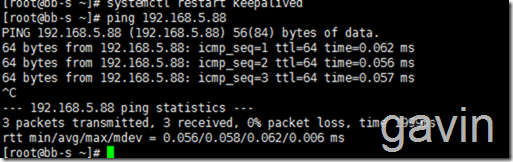
我们也测试ping一下vistual ip:
ping 192.168.5.88
接下来我们要实现realserver服务器配置
我们需要在两台web(http)192.168.5.21,192.168.5.22,需要在这两台服务器上配置虚拟VIP,所以在服务器上执行以下脚本
首先在192.168.5.21服务器上新建脚本文件
vim real_server
然后添加一下脚本内容:
#!/bin/bash
# chkconfig: 2345 85 35
# Description: Start real server with host boot
VIP=192.168.5.88
function start() {
ifconfig lo:0 $VIP netmask 255.255.255.255 broadcast $VIP
echo 1 >/proc/sys/net/ipv4/conf/lo/arp_ignore
echo 2 >/proc/sys/net/ipv4/conf/lo/arp_announce
echo 1 >/proc/sys/net/ipv4/conf/all/arp_ignore
echo 2 >/proc/sys/net/ipv4/conf/all/arp_announce
echo “Real Server $(uname -n) started”
}
function stop() {
ifconfig lo:0 down
ifconfig lo:0 $VIP netmask 255.255.255.255 broadcast $VIP
echo 0 >/proc/sys/net/ipv4/conf/lo/arp_ignore
echo 0 >/proc/sys/net/ipv4/conf/lo/arp_announce
echo 0 >/proc/sys/net/ipv4/conf/all/arp_ignore
echo 0 >/proc/sys/net/ipv4/conf/all/arp_announce
echo “Real Server $(uname -n) stopped”
}
case $1 in
start)
start
;;
stop)
stop
;;
*)
echo “Usage: $0 {start|stop}”
exit 1
esac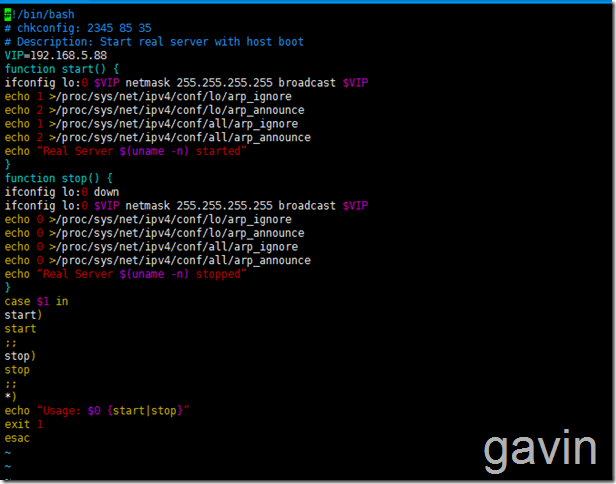
保存退出后
然后赋予执行权限
chmoe a+x realserver

然后将脚本拷贝到第二台web服务器上:192.168.5.22
scp /DATA/real_server root@192.168.5.22/DATA/

我们在第二台服务器上查看

最后我们说一下如何将realserver的脚本添加到随系统启动
我们将使用chkconfig --add 来管理服务器的添加、顺序
cp realserver /etc/init.d/ 将脚本拷贝到指定目录
chkconfig --add realserver 添加realserver脚本到自动启动
chkconfig --list 查看自动启动服务

chkconfig --list 查看自动启动服务
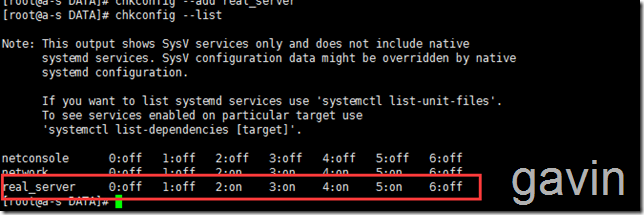
通过以上配置后,我们就可以通过服务进行操作了
/etc/init.d/realserver stop
/etc/init.d/realserver start

chkconfig realserver on 设置为自动启动

然后我们在第二台web服务器上做同样的操作
cp realserver /etc/init.d/ 将脚本拷贝到指定目录
chkconfig --add realserver 添加realserver脚本到自动启动
chkconfig --list 查看自动启动服务

chkconfig --list 查看自动启动服务
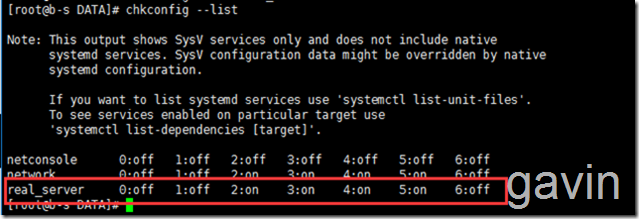
通过以上配置后,我们就可以通过服务进行操作了
/etc/init.d/realserver stop
/etc/init.d/realserver start
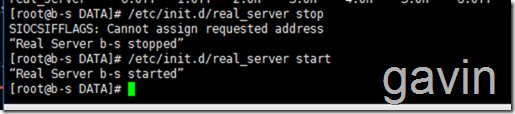
chkconfig realserver on 设置为自动启动

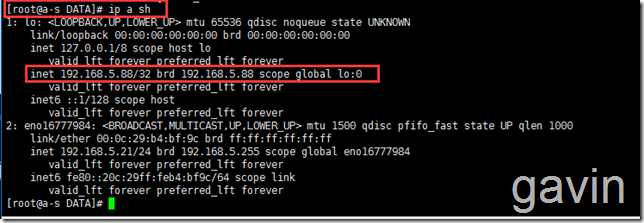
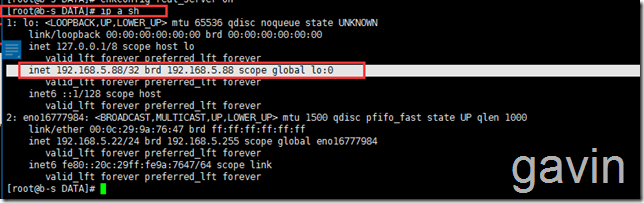
接下来我们就是测试了,我们在两台realserver上执行查看ip状态
a-s
ip a sh
b-s
ip a sh
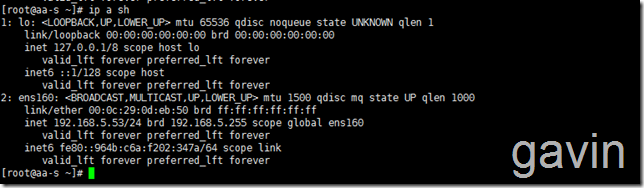
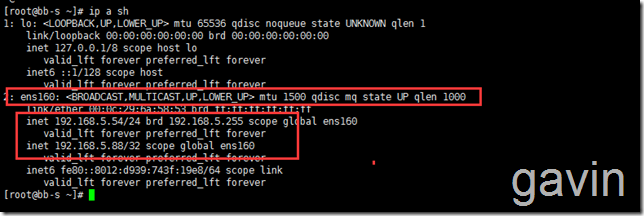
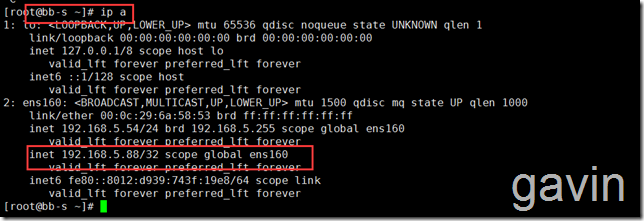
最后我们在keelalived服务器上查看ip状态,从状态上看,我们的keepalived是监听在备服务器上的,如果将备服务器keepalibed停止后,会切换到主服务器上的
aa-s  主服务器
ip a sh
备服务器:
bb-s 备服务器
ip a sh
最后我们就是测试了
我们访问vistual ip进行测试
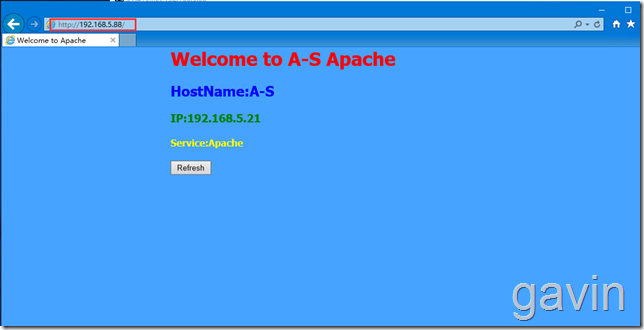
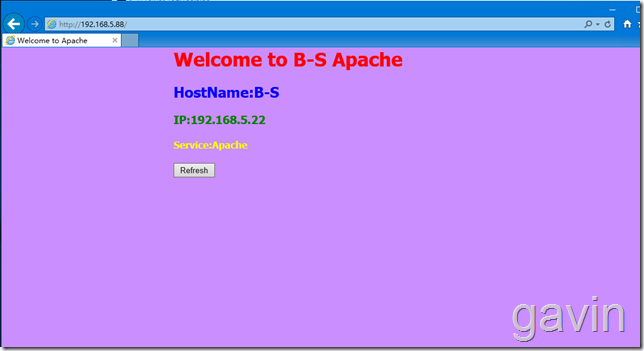
我们查看log
tail -f /var/log/message
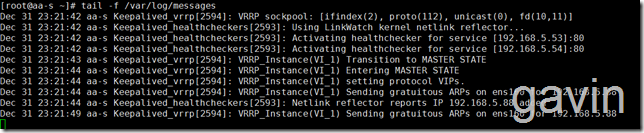
我们停止主服务器的keepalived服务
查看备服务器的log

![Image(79)[1]](https://s3.51cto.com/wyfs02/M02/8C/45/wKioL1hn5UaDA-ktAABwH5iyyFA893.png "Image(79)[1]")
最后我们说一下keepalived的log;Keepalived默认所有的日志都是写入到/var/log/message下的,由于message的日志太多了,而Keepalived的日志又很难分离出来,所以本文提供了一个调整Keepalived日志输出路径的方法。
具体操作步骤如下:
一、修改 /etc/sysconfig/keepalived
默认配置
vim /etc/sysconfig/keepalived
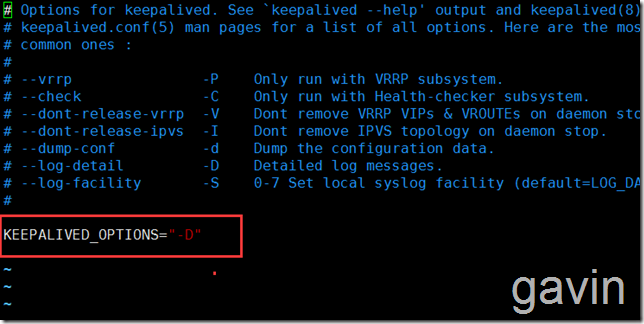
vim /etc/sysconfig/keepalived
把KEEPALIVED_OPTIONS="-D" 修改为KEEPALIVED_OPTIONS="-D -d -S 0"
#其中-S指定syslog的facility
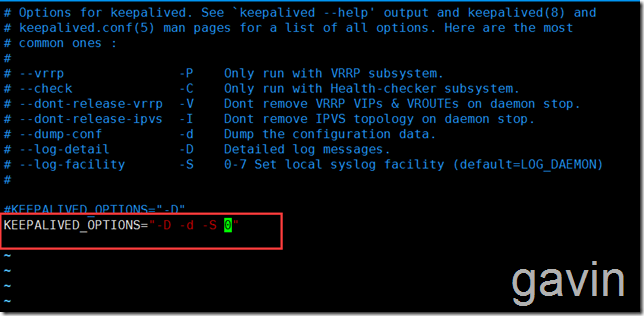
接下来设置syslog
vim  /etc/rsyslog.conf
注:Cnetos6的路劲是/etc/syslog.conf
Centos7的路劲是/etc/rsyslog.conf
添加以下配置
# keepalived -S 0
local0.*    /var/log/keepalived.log
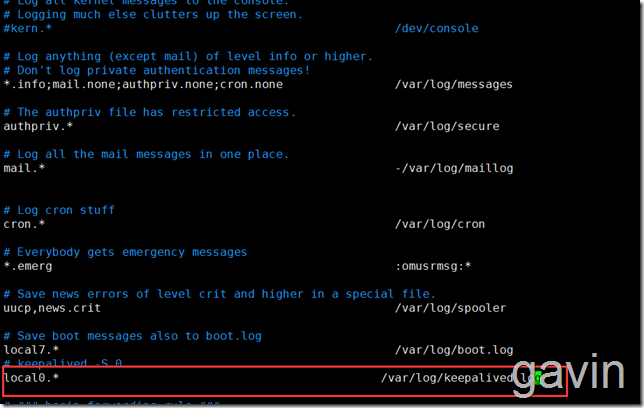
保存退出后,重启服务
systemctl restart rsyslog
systemctl restart keepalived

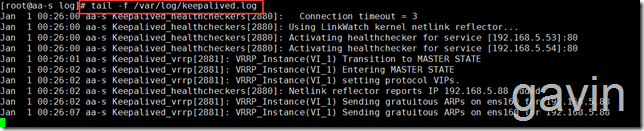
接下来我们查看/var/log路劲是否生成了keepalived.log文件

tail -f /var/log/keepalived.conf
转载于:https://blog.51cto.com/gaowenlong/1887956

)


函数)
覆盖(override)与隐藏)


)

 常见的C程序错误...)


方法)

第三课:常见属性)
