使用 ConfigMap 挂载配置文件
Intro
有一些敏感信息比如数据库连接字符串之类的出于安全考虑,这些敏感信息保存在了 AzureKeyVault 中,最近应用上了 k8s 部署,所以想把 AzureKeyVault 的信息迁移到 ConfigMap,不再依赖 AzureKeyVault。
ConfigMap
新建一个 ConfigMap,你可以从文件创建,如何创建ConfigMap 可以参考官方文档,也可以直接手动编辑,这里用的 ConfigMap 如下所示:
apiVersion: v1
kind: ConfigMap
metadata:	name: reservation-configs	namespace: default
data:	appsettings: |	{      	"ConnectionStrings": {	"Redis": "redis-server",	"Reservation": "Server=localhost;uid=liweihan;pwd=**;database=Reservation",	"ElasticSearch": "elasticsearch"	},	"MpWechat":{	"AppId": "wx4a41d3773ae55543",	"AppSecret": "**********",	"Token": "AmazingDotNet",	"AESKey": "------------"	},	"AppSettings": {	"WechatSubscribeReply": "",	"SentryClientKey": "https://**"	},	"Tencent": {	"Captcha": {	"AppId": "2062135016",	"AppSecret": "****"	}	},	"GoogleRecaptcha": {	"SiteKey": "6Lc-**",	"Secret": "6Lc-**"	},	"Logging": {	"LogLevel": {	"Default": "Warning",	"ActivityReservation": "Debug",	"RequestLog": "Debug"	}	}	}
挂载 ConfigMap 中的配置文件到 Pod
Deployment 定义如下所示, 这里直接把上面定义的 appsettings 直接挂载为应用程序的根目录下 appsettings.json 文件
apiVersion: apps/v1kind: Deploymentmetadata:name: activityreservationnamespace: defaultlabels:app: activityreservationspec:replicas: 2revisionHistoryLimit: 2 # how many old ReplicaSets for this Deployment you want to retain, https://kubernetes.io/docs/concepts/workloads/controllers/deployment/#clean-up-policyselector:matchLabels:app: activityreservationminReadySeconds: 0strategy:type: RollingUpdaterollingUpdate:maxUnavailable: 1maxSurge: 1template:metadata:labels:app: activityreservationspec:dnsConfig:options:- name: ndotsvalue: "1"containers:- name: activityreservationimage: weihanli/activityreservation:20190529.2imagePullPolicy: IfNotPresentresources:limits:memory: "256Mi"cpu: "300m"readinessProbe:tcpSocket:port: 80initialDelaySeconds: 60periodSeconds: 30livenessProbe:httpGet:path: /Healthport: 80initialDelaySeconds: 60periodSeconds: 60ports:- containerPort: 80volumeMounts:- name: settingsmountPath: /app/appsettings.jsonsubPath: appsettingsvolumes:- name: settingsconfigMap:name: reservation-configs
测试
1. 部署 ConfigMap
kubectl apply -f ConfigMap.yaml
2. 部署 deployment
kubectl apply -f reservation-deployment.yaml
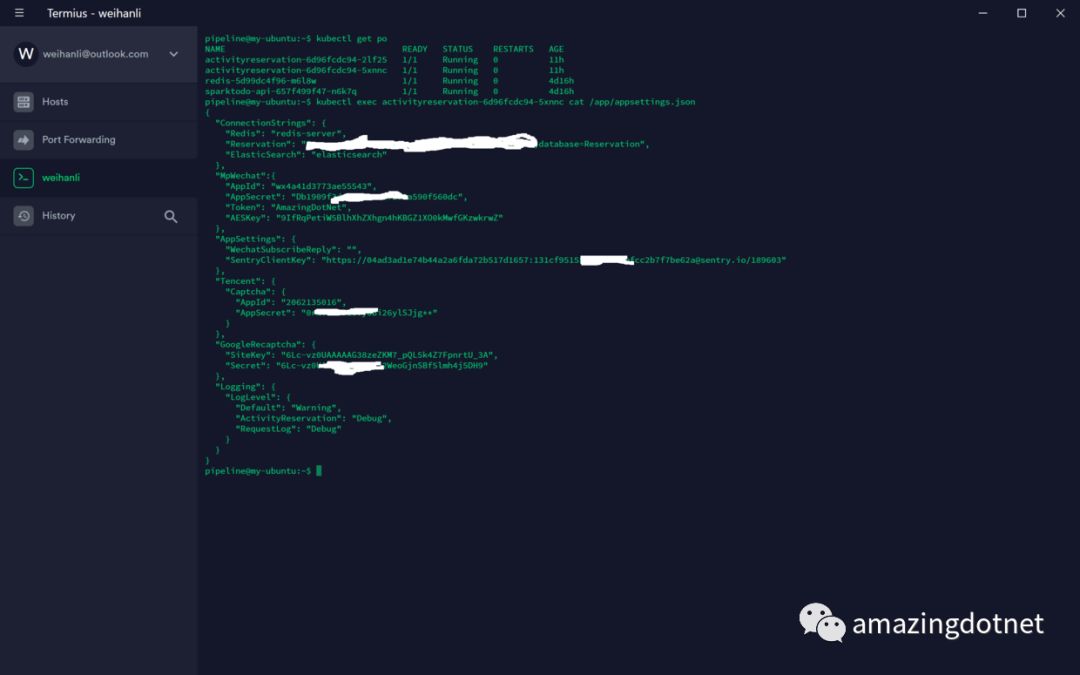
3. 等待 pod 启动之后,查看 appsettings.json 文件内容是否成功被替换掉
获取对应的 pod 名称,然后通过 kubectlexec<pod-name>cat/app/appsettings.json 来获取pod中 appsettings.json 文件的内容
出现 ConnectionStrings 就证明文件被替换掉了,原始的配置文件里是没有 ConnectionStrings 节点的,原始的方式是通过从 AzureKeyVault 中加载的
Reference
https://kubernetes.io/docs/tasks/configure-pod-container/configure-pod-configmap/#understanding-configmaps-and-pods
https://github.com/WeihanLi/ActivityReservation



)


